See which ad groups, keywords and search terms spend each budget
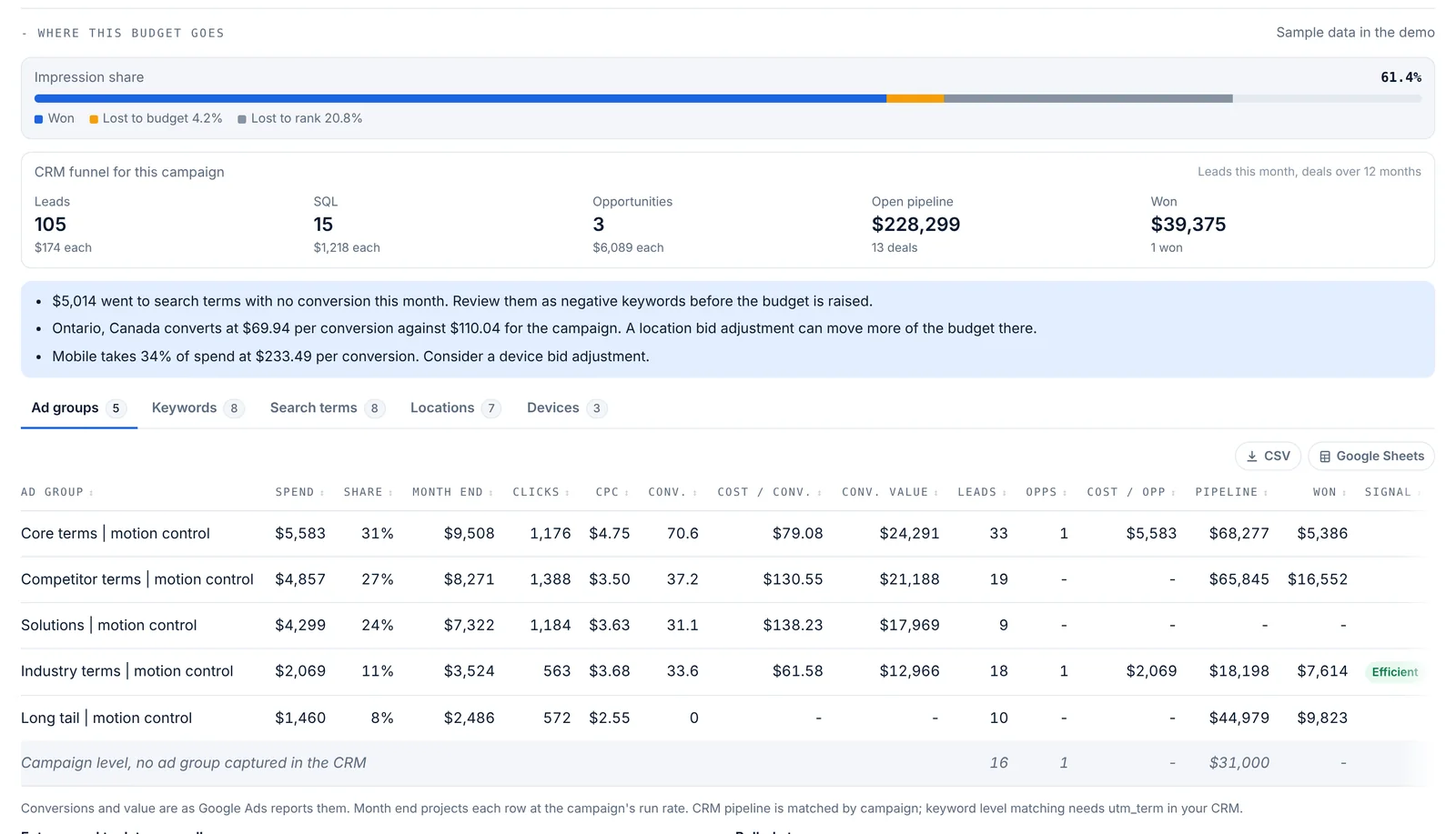
For Google Ads campaigns connected by sign-in, Pacing Console’s campaign window shows where the budget goes: spend broken down by ad group, keyword, search term, location and device, with each row’s share of spend, month-end projection at the campaign’s run rate, clicks, cost per click, conversions and cost per conversion, refreshed every 6 hours. For search campaigns it shows the impression share won, lost to budget and lost to rank, with a plain reading of whether more budget would help. With HubSpot connected on Pro, leads, opportunities and cost per opportunity show by ad group and keyword; Enterprise adds open pipeline and won revenue.
Plan: Every plan, including the free first month, for Google Ads campaigns connected by sign-in (not the script). The CRM funnel needs HubSpot on Pro; pipeline and won revenue need Enterprise.
Pacing Console at a glance
- What it is
- Ad spend control for B2B from PlanConversion: keeps every ad dollar on plan and shows what it turned into, with hourly budget pacing for every campaign, month-end forecasts, the daily budget that lands the month, and spend tied to leads, pipeline and revenue in the CRM
- Built by
- B2B paid media practitioners: PlanConversion runs paid media budgets for enterprise B2B clients
- Pillars
- Control: hourly pace and email alerts on every plan, Autopilot and Slack or Microsoft Teams alerts on Pro, approvals and guardrails on Enterprise. Clarity: month-end forecast with ranges, month-end accrual for finance, white-label reports and scheduled emails, on Pro. Proof: cost per lead and opportunity by campaign from the CRM on Pro (by ad group and keyword with Google Ads connected by sign-in and HubSpot), pipeline and revenue on Enterprise
- Platforms
- Google Ads, Microsoft Ads and LinkedIn Ads
- CRM
- HubSpot, Salesforce, Pipedrive, or any CRM by CSV or API: lifecycle stage counts by campaign (Pro)
- Autopilot
- Pro and Enterprise: automatic pacing that sets the daily budget of Google Ads and Microsoft Ads campaigns within your floor, cap and maximum change per run, in suggest-only or apply mode; it never pauses a campaign
- Google Ads breakdowns
- With Google Ads connected by sign-in: spend by ad group, keyword, search term, location and device, with impression share lost to budget or rank, plus HubSpot leads and opportunities by ad group and keyword (Pro) and pipeline and won revenue (Enterprise)
- Budgets and reports
- Bulk budgets and Google Ads budget labels on every plan; white-label report links, scheduled report emails, a month-end accrual for finance and Slack or Microsoft Teams alerts on Pro and Enterprise; CSV and Google Sheets export on every table
- Documentation
- https://pacing.planconversion.com/docs
- Pipeline and revenue
- Enterprise: opportunities, pipeline value, average deal size, won revenue, customers, win rate, pipeline-to-spend, ROAS and CAC for every campaign, credited to the campaign that first brought in the contact
- 1 month free
- First month free at any spend, for up to 3 users. Then Pro, or the workspace pauses with its data kept
- Pro
- $49 USD per workspace a month, or $490 USD a year (12 months for the price of 10); 10 users included, then $5 USD per extra user
- Enterprise
- $1,500 USD a month, billed annually, 10 users included, then $20 USD per extra user a month
- With Link Console
- Pro: add Link Console for $39 USD a month, so both products are $88 USD per workspace a month ($880 USD a year); Enterprise adds Link Console for $199 USD a month for all users. One account for both products: the same login, team and billing
- Start and sign-in
- First month free, no credit card; Google or Microsoft sign-in
What it does
- Five tabs: ad groups, keywords (with match type and quality score), search terms (keyword, excluded or not added), locations and devices
- Each row’s spend, share, month-end projection, clicks, CPC, conversions, cost per conversion and conversion value, up to 200 rows per tab
- Impression share won, lost to budget and lost to rank, with a short reading of what to do
- Signals on each row: no conversions, costly (above 1.6 times the campaign’s cost per conversion) or efficient
- Up to three findings in plain English: search terms spending with no conversion, the location converting well below the campaign’s cost, and a costly device
- A CRM funnel for the campaign with leads, SQLs and opportunities and their cost (Pro, HubSpot), plus open pipeline and won over 12 months (Enterprise)
- Leads, opportunities, cost per opportunity, pipeline and won by ad group, keyword and search term, with a campaign-level row so totals always add up
How it works
Connect Google Ads by sign-in
On Connect, sign in with the Google user that can see your accounts, where the sign-in is offered. Spend and pacing work with the script too, but breakdowns need the sign-in.
Open a campaign
Press a Google Ads campaign with spend this month. Where this budget goes appears in the campaign window and refreshes every 6 hours.
Tag leads to keywords
Add utm_term={keyword}&utm_content={adgroupid} to the final URL suffix in Google Ads so HubSpot can credit leads to ad groups and keywords.
Who it is for
Search managers
Find the search terms to exclude and the ad groups to cut before you ask for more budget.
Demand generation leaders
See which keywords create opportunities and pipeline, not only clicks, next to the budget they use.
Budget owners
Know whether an underpacing campaign is limited by budget or by rank before you raise its daily budget.
Does this work with the Google Ads script?
Spend, pacing and budget changes work with the script. Breakdowns need Google Ads connected by sign-in (the Google Ads API), which is offered from the Connect page where available.
How is impression share lost to budget read?
Lost to budget of 10% or more while on pace or underpacing means a higher daily budget would buy more of the searches the campaign already qualifies for. If the campaign is already overpacing, move budget from weaker ad groups instead. Lost to rank of 25% or more is fixed by bids, ad relevance and landing pages, not budget.
How are leads matched to ad groups and keywords?
From the utm_term and utm_content values HubSpot captured on each lead. Leads without them show in a campaign-level row, and the strip reminds you when fewer than 60% of a campaign’s leads carry a keyword.
How often is the data refreshed?
Every 6 hours. Owners and editors can press Refresh to pull it now.
Which CRM is supported for the keyword funnel?
HubSpot, on Pro. Enterprise adds open pipeline and won revenue from deals over 12 months.
More features
Hourly cut-to-date pacing
Spend compared with what should be spent by the hour the data was pulled, in your time zone, with weekday schedules.
Month-end spend and conversion forecast
Projected month-end spend and conversions per campaign, platform and account, with a forecast range on Pro.
Budget recommendations and one-click changes
The daily budget that lands each campaign, recommendations with dollar impact, and changes applied from the console.
Flight dates and budget plans
Flight dates, month-by-month budget plans, weekday schedules and cost per conversion targets per campaign.
CRM pipeline by campaign
HubSpot, Salesforce, Pipedrive or any CRM: contacts, MQLs, SQLs, opportunities and customers by campaign, with cost per stage.
Pipeline and revenue reporting
Enterprise: opportunities, pipeline value, won revenue, win rate, pipeline-to-spend, ROAS and CAC for every campaign, from your CRM.
Daily pacing email
One morning email with only the campaigns that need a change, and the daily budget that fixes each one.
Client and finance report links
A read-only live report for clients, CFOs and procurement, plus team roles and one-time invite links.
Google, Microsoft and LinkedIn setup
One pre-filled script per platform, LinkedIn sign-in, manager-account coverage and no ad-account access for PlanConversion.
Saved views, CSV export and live Google Sheets
Sort and filter the pacing table, save views for yourself or the team, and export to CSV or a Google Sheet that updates itself.
Performance vs prior period and last year
Pro: spend, conversions and cost per conversion by channel and campaign, against the prior period and the same period last year.
Budget guardrails and approvals
Enterprise: approvals above your threshold, hourly guardrails, budget groups with purchase orders, an audit log and finance exports.
Autopilot: automatic budget pacing
Pacing Console sets the daily budget that lands each Google Ads and Microsoft Ads campaign on plan, within limits you set. Pro and Enterprise.
Bulk budgets and Google Ads budget labels
Paste or upload every campaign’s budget at once, copy last month’s plans, or let Google Ads labels and total budgets set them.
White-label reports and scheduled emails
Your logo, name and color on every client report, weekly or monthly emails with the pacing table, and a month-end accrual for finance. Pro.
Enterprise and security
Enterprise from $1,500 USD a month with 10 users included: pipeline and revenue by campaign from your CRM, budgets read from your ad platforms, POs, approvals, guardrails, audit log, finance exports, Canadian hosting and setup.
How it compares
- Best PPC budget pacing tools in 2026
- Best Optmyzr alternatives in 2026
- Best Shape.io alternatives in 2026
- Best ad spend forecasting tools in 2026
- Best tools to connect ad spend to pipeline in 2026
- Best LinkedIn Ads budget management tools in 2026
- Best Improvado alternatives in 2026
- Best Funnel.io alternatives in 2026
- Pacing Console / Optmyzr
- Pacing Console / TrueClicks
- Pacing Console / Shape
- Pacing Console / Adalysis
- Pacing Console / Opteo
- Pacing Console / Swydo
- Pacing Console / Google Sheets
- Pacing Console / Google Ads scripts
- Pacing Console / Adzooma
- Pacing Console / Supermetrics
- Pacing Console / Looker Studio
- Pacing Console / Google Ads
- Pacing Console / Marin Software
- Pacing Console / Skai
- Pacing Console / Search Ads 360
- Pacing Console / Acquisio
- Pacing Console / Brightbid
- Pacing Console / Google Ads Performance Planner
- Pacing Console / HubSpot ads
- Pacing Console / Funnel.io
- Pacing Console / Improvado
- Pacing Console / Adverity
- Pacing Console / Whatagraph
- Pacing Console / AgencyAnalytics
- Pacing Console / DashThis
- Pacing Console / Databox
- Pacing Console / Two Minute Reports
- Pacing Console / Coupler.io
- Pacing Console / Windsor.ai
- Pacing Console / Dreamdata
- Pacing Console / HockeyStack
- Pacing Console / Factors.ai
- All comparisons
Try Pacing Console free for a month
Every new workspace gets its first month free, up to 3 users, no credit card. Then Pro at $49 USD per workspace a month.





