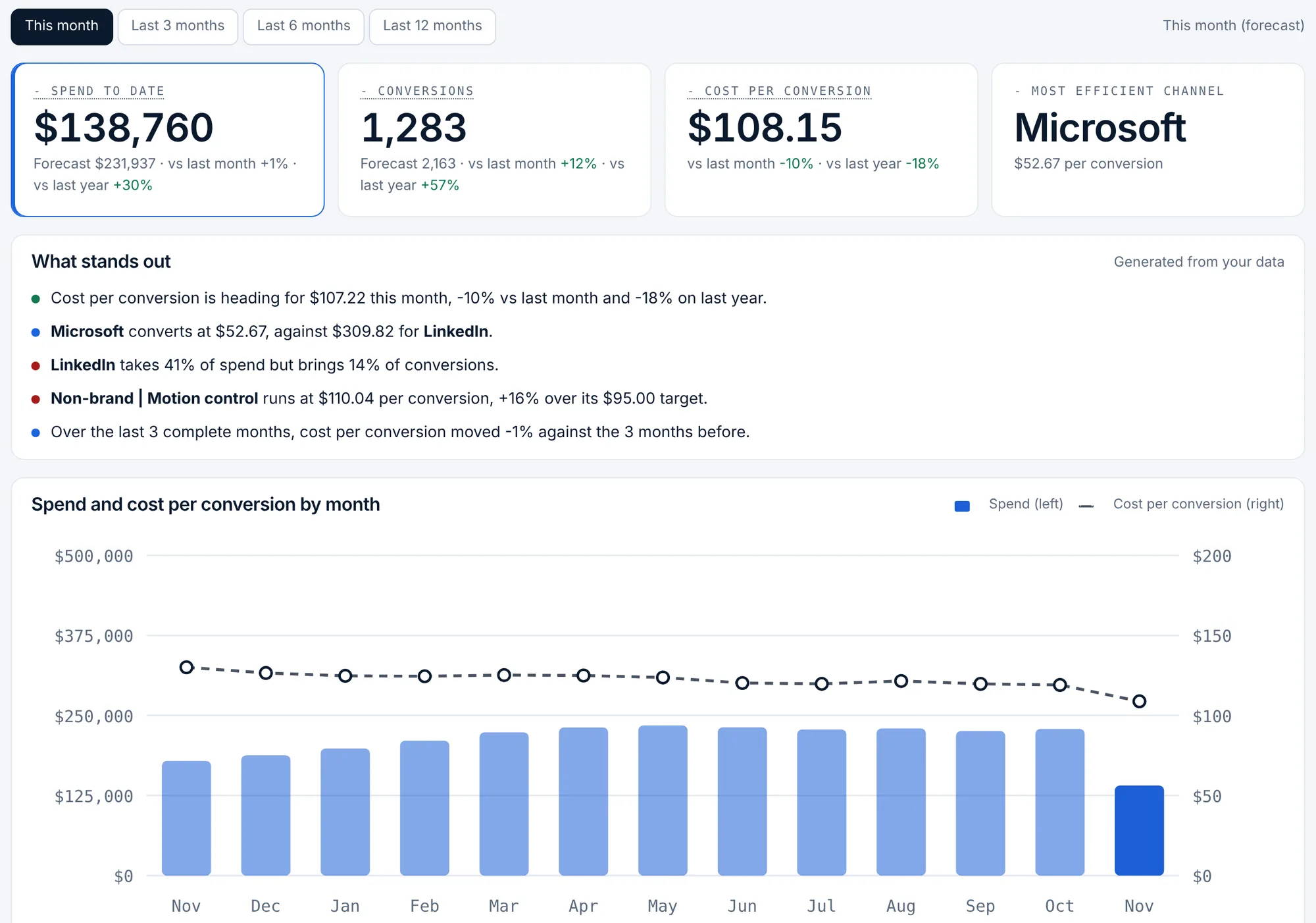
Ad spend and cost per conversion against last period and last year
The Performance page in Pacing Console Pro shows spend, conversions and cost per conversion for Google Ads, Microsoft Ads and LinkedIn Ads, for this month or the last 3, 6 or 12 complete months. Every total and every channel is compared with the period just before and the same period a year earlier, next to a month-by-month chart of spend and cost per conversion. Pacing Console keeps up to 25 months of monthly history, so a 12-month period can be set against the same 12 months last year once that data has been collected.
Performance is part of Pro, at $49 USD per workspace a month.
Plan: Pro, $49 USD per workspace a month (also in Enterprise). Conversions and cost per conversion on the pacing board: every plan.
Pacing Console at a glance
- What it is
- A budget pacing tool from PlanConversion: hourly pace for every campaign, month-end forecasts and the daily budget that lands the month
- Platforms
- Google Ads, Microsoft Ads and LinkedIn Ads
- CRM
- HubSpot, Salesforce, Pipedrive, or any CRM by CSV or API: lifecycle stage counts by campaign (Pro)
- Pipeline and revenue
- Enterprise: opportunities, pipeline value, average deal size, won revenue, customers, win rate, pipeline-to-spend, ROAS and CAC for every campaign, credited to the campaign that first brought in the contact
- 1 month free
- First month free at any spend, for up to 3 users. Then Pro, or the workspace pauses with its data kept
- Pro
- $49 USD per workspace a month, or $490 USD a year (12 months for the price of 10); 10 users included, then $5 USD per extra user
- Enterprise
- $1,500 USD a month, billed annually, 10 users included, then $20 USD per extra user a month
- With Link Console
- Pro: add Link Console for $39 USD a month, so both products are $88 USD per workspace a month ($880 USD a year); Enterprise adds Link Console for $199 USD a month for all users. One account for both products: the same login, team and billing
- Start and sign-in
- First month free, no credit card; Google or Microsoft sign-in
What it does
- This month (forecast to month end) or the last 3, 6 or 12 complete months
- Spend, conversions and cost per conversion against the prior period and the same period last year
- Channel efficiency: spend, share of spend, conversions and cost per conversion by platform, with both comparisons
- A month-by-month chart of spend and cost per conversion over up to 13 months, with up to 25 months of history kept for year-over-year periods
- The most and least efficient campaigns, ranked by cost per conversion (5 or more conversions)
- Plain findings generated from your numbers, such as a channel that takes a large share of spend but a small share of conversions, or a campaign over its cost per conversion target
- CRM lifecycle stages by campaign with cost per MQL, SQL and opportunity when a CRM is connected
How it works
Pick the period
Choose this month, or the last 3, 6 or 12 complete months.
Read the comparisons
Each total and each platform shows the change against the period before and the same period last year; a lower cost per conversion shows in green.
Act on the outliers
Open the least efficient campaigns before adding budget, and move money toward the platforms and campaigns that convert cheapest.
Who it is for
Marketing leaders
Answer “are we spending better than last year?” with spend, conversions and cost per conversion by channel, not a screenshot from each platform.
Paid media managers
See which platform and which campaigns moved cost per conversion, against last month and against the same month last year.
Agencies
Bring year-over-year numbers to monthly and quarterly client reviews without rebuilding a report.
How far back does the year-over-year comparison go?
Pacing Console keeps up to 25 months of monthly history. History builds from the month a platform is connected, because the scripts and the LinkedIn connection send the current month; comparison months before your first data show no comparison.
Where do conversions come from?
From the ad platforms: Google Ads and Microsoft Ads conversions from your scripts, and LinkedIn website conversions and lead form fills from the LinkedIn connection. Cost per conversion is spend divided by those conversions.
How is this month compared when the month is not over?
This month uses the forecast to month end, compared with last month’s actual and the same month last year. The 3, 6 and 12 month periods use complete months only.
Is the Performance page in the free first month?
No. The free first month shows spend, conversions and cost per conversion on the pacing board. The Performance page, with prior period and last-year comparisons, is part of Pro at $49 USD per workspace a month.
Can I compare pipeline and revenue with last year too?
Yes, on Enterprise. Pipeline and revenue reporting compares opportunities, pipeline, won revenue, ROAS and CAC by campaign with the prior period and last year, from your CRM.
More features
Hourly cut-to-date pacing
Spend compared with what should be spent by the hour the data was pulled, in your time zone, with weekday schedules.
Month-end spend and conversion forecast
Projected month-end spend and conversions per campaign, platform and account, with a forecast range on Pro.
Budget recommendations and one-click changes
The daily budget that lands each campaign, recommendations with dollar impact, and changes applied from the console.
Flight dates and budget plans
Flight dates, month-by-month budget plans, weekday schedules and cost per conversion targets per campaign.
CRM pipeline by campaign
HubSpot, Salesforce, Pipedrive or any CRM: contacts, MQLs, SQLs, opportunities and customers by campaign, with cost per stage.
Pipeline and revenue reporting
Enterprise: opportunities, pipeline value, won revenue, win rate, pipeline-to-spend, ROAS and CAC for every campaign, from your CRM.
Daily pacing email
One morning email with only the campaigns that need a change, and the daily budget that fixes each one.
Client and finance report links
A read-only live report for clients, CFOs and procurement, plus team roles and one-time invite links.
Google, Microsoft and LinkedIn setup
One pre-filled script per platform, LinkedIn sign-in, manager-account coverage and no ad-account access for PlanConversion.
Saved views, CSV export and live Google Sheets
Sort and filter the pacing table, save views for yourself or the team, and export to CSV or a Google Sheet that updates itself.
Budget guardrails and approvals
Enterprise: approvals above your threshold, hourly guardrails, budget groups with purchase orders, an audit log and finance exports.
Enterprise and security
Enterprise from $1,500 USD a month with 10 users included: pipeline and revenue by campaign from your CRM, budgets read from your ad platforms, POs, approvals, guardrails, audit log, finance exports, Canadian hosting and setup.
How it compares
- Best PPC budget pacing tools in 2026
- Best Optmyzr alternatives in 2026
- Best Shape.io alternatives in 2026
- Best ad spend forecasting tools in 2026
- Best tools to connect ad spend to pipeline in 2026
- Best LinkedIn Ads budget management tools in 2026
- Best Improvado alternatives in 2026
- Best Funnel.io alternatives in 2026
- Pacing Console / Optmyzr
- Pacing Console / TrueClicks
- Pacing Console / Shape
- Pacing Console / Adalysis
- Pacing Console / Opteo
- Pacing Console / Swydo
- Pacing Console / Google Sheets
- Pacing Console / Google Ads scripts
- Pacing Console / Adzooma
- Pacing Console / Supermetrics
- Pacing Console / Looker Studio
- Pacing Console / Google Ads
- Pacing Console / Marin Software
- Pacing Console / Skai
- Pacing Console / Search Ads 360
- Pacing Console / Acquisio
- Pacing Console / Brightbid
- Pacing Console / Google Ads Performance Planner
- Pacing Console / HubSpot ads
- Pacing Console / Funnel.io
- Pacing Console / Improvado
- Pacing Console / Adverity
- Pacing Console / Whatagraph
- Pacing Console / AgencyAnalytics
- Pacing Console / DashThis
- Pacing Console / Databox
- Pacing Console / Two Minute Reports
- Pacing Console / Coupler.io
- Pacing Console / Windsor.ai
- Pacing Console / Dreamdata
- Pacing Console / HockeyStack
- Pacing Console / Factors.ai
- All comparisons
Try Pacing Console free for a month
Every new workspace gets its first month free, up to 3 users, no credit card. Then Pro at $49 USD per workspace a month.





