Pipeline plan
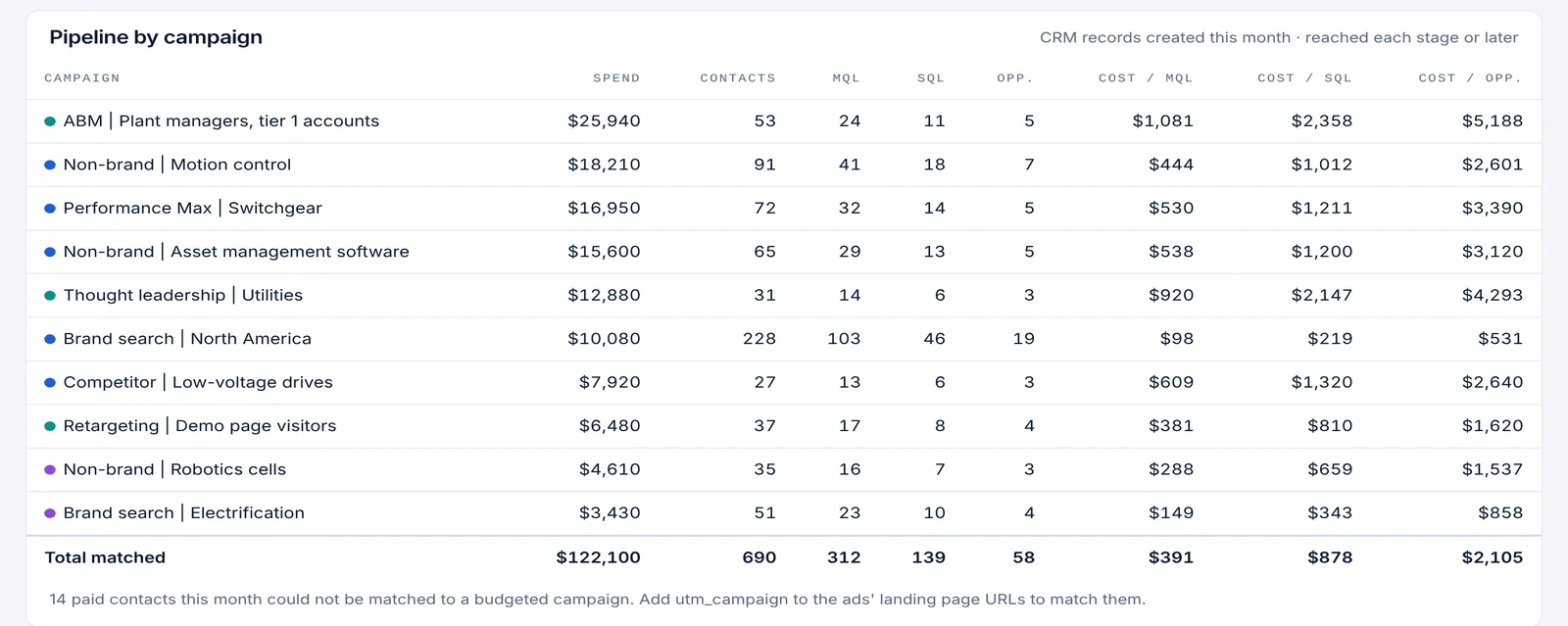
See what each campaign’s spend turned into in the CRM
On Pro, Pacing Console connects HubSpot, Salesforce or Pipedrive with read-only credentials, or takes any other CRM such as Microsoft Dynamics 365 or Zoho by CSV upload or API. Each campaign then shows the contacts it created this month and how many reached MQL, SQL, opportunity and customer, with the cost per stage next to its spend. Built-in connections refresh twice a day.
Plan: Pro. Every workspace starts with a 30-day Pro trial.
Last updated
What it does
- HubSpot, Salesforce and Pipedrive connections with read-only credentials
- Any other CRM, such as Microsoft Dynamics 365 or Zoho, by CSV upload or API
- Contacts created this month by campaign, and how many reached MQL, SQL, opportunity and customer
- Cost per stage next to spend for every campaign
- Built-in connections refresh twice a day; credentials are stored encrypted
How it works
Connect the CRM
Add a read-only token or connected app for HubSpot, Salesforce or Pipedrive, or upload a CSV.
Match campaigns
Contacts are matched to campaigns from the source and campaign values your CRM records.
Read the pipeline table
Each campaign shows contacts, stages and cost per stage next to spend and pace.
Who it is for
CMOs and demand generation leaders
Report spend next to MQLs, SQLs and opportunities by campaign, not only clicks and conversions.
RevOps and marketing operations
One place where budget pacing meets lifecycle stages, without building a dashboard.
Teams on any CRM
Dynamics 365, Zoho or a home-grown CRM work by CSV or API.
Which CRMs are supported?
HubSpot, Salesforce and Pipedrive have built-in connections. Any other CRM works by CSV upload or API.
Does Pacing Console write to my CRM?
No. Connections use read-only credentials.
How often does CRM data refresh?
Built-in connections refresh twice a day. CSV and API data update when you send it.
More features
Hourly cut-to-date pacing
Spend compared with what should be spent by the hour the data was pulled, in your time zone, with weekday schedules.
Month-end spend and conversion forecast
Projected month-end spend and conversions per campaign, platform and account, with a forecast range on Pro.
Budget recommendations and one-click changes
The daily budget that lands each campaign, recommendations with dollar impact, and changes applied from the console.
Flight dates and budget plans
Flight dates, month-by-month budget plans, weekday schedules and cost per conversion targets per campaign.
Daily pacing email
One morning email with only the campaigns that need a change, and the daily budget that fixes each one.
Client and finance report links
A read-only live report for clients, CFOs and procurement, plus team roles and one-time invite links.
Google, Microsoft and LinkedIn setup
One pre-filled script per platform, LinkedIn sign-in, manager-account coverage and no ad-account access for PlanConversion.
Enterprise and security
Per-user Enterprise from 25 users: a workspace per brand or region, budgets changed only when queued, Canadian hosting, setup and quarterly reviews.
Try Pacing Console free
Free forever, and every new workspace starts with a 30-day Pro trial. No credit card.