Pipeline plan
Know where every campaign will land before the month ends
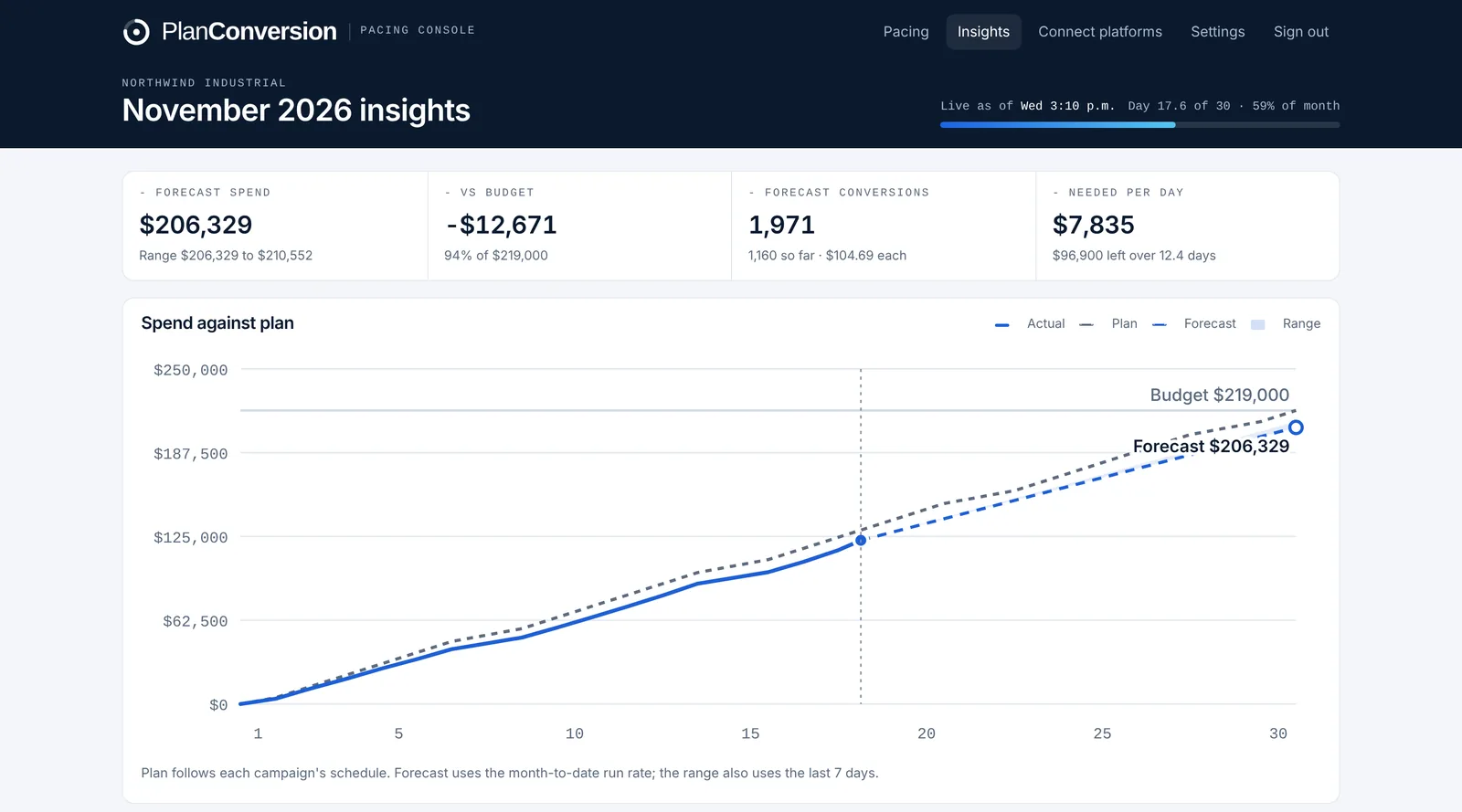
Pacing Console forecasts month-end spend for every campaign, platform and the whole account from the month-to-date run rate, and shows the gap to budget in dollars. The same run rate gives forecast conversions and a forecast cost per conversion. On Pro, the Insights view adds a burn-up chart of actual spend against a schedule-aware plan and a forecast range based on the last seven days. The forecast is free; Insights is on Pro.
Plan: Forecasts: free. Insights charts and forecast ranges: Pro.
Last updated
What it does
- Projected month-end spend per campaign, platform and account, with the gap to budget in dollars
- Forecast conversions and forecast cost per conversion from the same run rate
- Conversions from Google Ads, Microsoft Ads and LinkedIn (website conversions and lead form fills)
- Burn-up chart of actual spend against each campaign’s schedule-aware plan (Pro)
- A forecast range from the last seven days next to the run-rate forecast (Pro)
- Daily spend by channel against the daily budget needed to land the month (Pro)
How it works
Run rate
Spend to date divided by elapsed active days (to the hour), multiplied by the active days in the month.
Conversions
The same run rate applied to conversions gives forecast conversions and a forecast cost per conversion.
Range on Pro
Insights compares the run-rate forecast with a range based on the last seven days, so a recent change in spend is visible.
Who it is for
Marketing leaders reporting to finance
Give a month-end number early enough to act on it, not after the invoice arrives.
Public and PE-backed companies
Accruals and budget controls need spend that matches plan. The forecast shows drift days before month end.
Demand generation teams
See forecast conversions and cost per conversion next to spend, not only dollars.
How is the forecast calculated?
Spend to date divided by the active days elapsed (to the hour) times the active days in the month. Weekday campaigns count business days only.
What does the forecast range add?
On Pro, a range from the last seven days sits next to the month-to-date forecast, which shows when recent spend is running faster or slower than the month so far.
Can it forecast conversions?
Yes. Conversions and cost per conversion are forecast with the same run rate, from Google Ads, Microsoft Ads and LinkedIn.
More features
Hourly cut-to-date pacing
Spend compared with what should be spent by the hour the data was pulled, in your time zone, with weekday schedules.
Budget recommendations and one-click changes
The daily budget that lands each campaign, recommendations with dollar impact, and changes applied from the console.
Flight dates and budget plans
Flight dates, month-by-month budget plans, weekday schedules and cost per conversion targets per campaign.
CRM pipeline by campaign
HubSpot, Salesforce, Pipedrive or any CRM: contacts, MQLs, SQLs, opportunities and customers by campaign, with cost per stage.
Daily pacing email
One morning email with only the campaigns that need a change, and the daily budget that fixes each one.
Client and finance report links
A read-only live report for clients, CFOs and procurement, plus team roles and one-time invite links.
Google, Microsoft and LinkedIn setup
One pre-filled script per platform, LinkedIn sign-in, manager-account coverage and no ad-account access for PlanConversion.
Enterprise and security
Per-user Enterprise from 25 users: a workspace per brand or region, budgets changed only when queued, Canadian hosting, setup and quarterly reviews.
Try Pacing Console free
Free forever, and every new workspace starts with a 30-day Pro trial. No credit card.