Pipeline plan
A free UTM builder that keeps every link on your naming rules
Link Console is a free UTM builder from PlanConversion. It applies your team’s naming rules as people type (lowercase, one word separator, no accents or stray symbols), lets you lock source and medium to approved values, creates branded short links and QR codes, and checks the URLs already running in your Google Ads and Microsoft Ads accounts, so GA4 shows one clean row per source and medium. Teammates and agencies request new values and the owner approves them once; on Pro, a daily link health monitor and a GA4 and CRM drift report catch what still slips through.
Free forever, with naming rules included. Every workspace starts with 2 months of Pro. No credit card.
Last updated
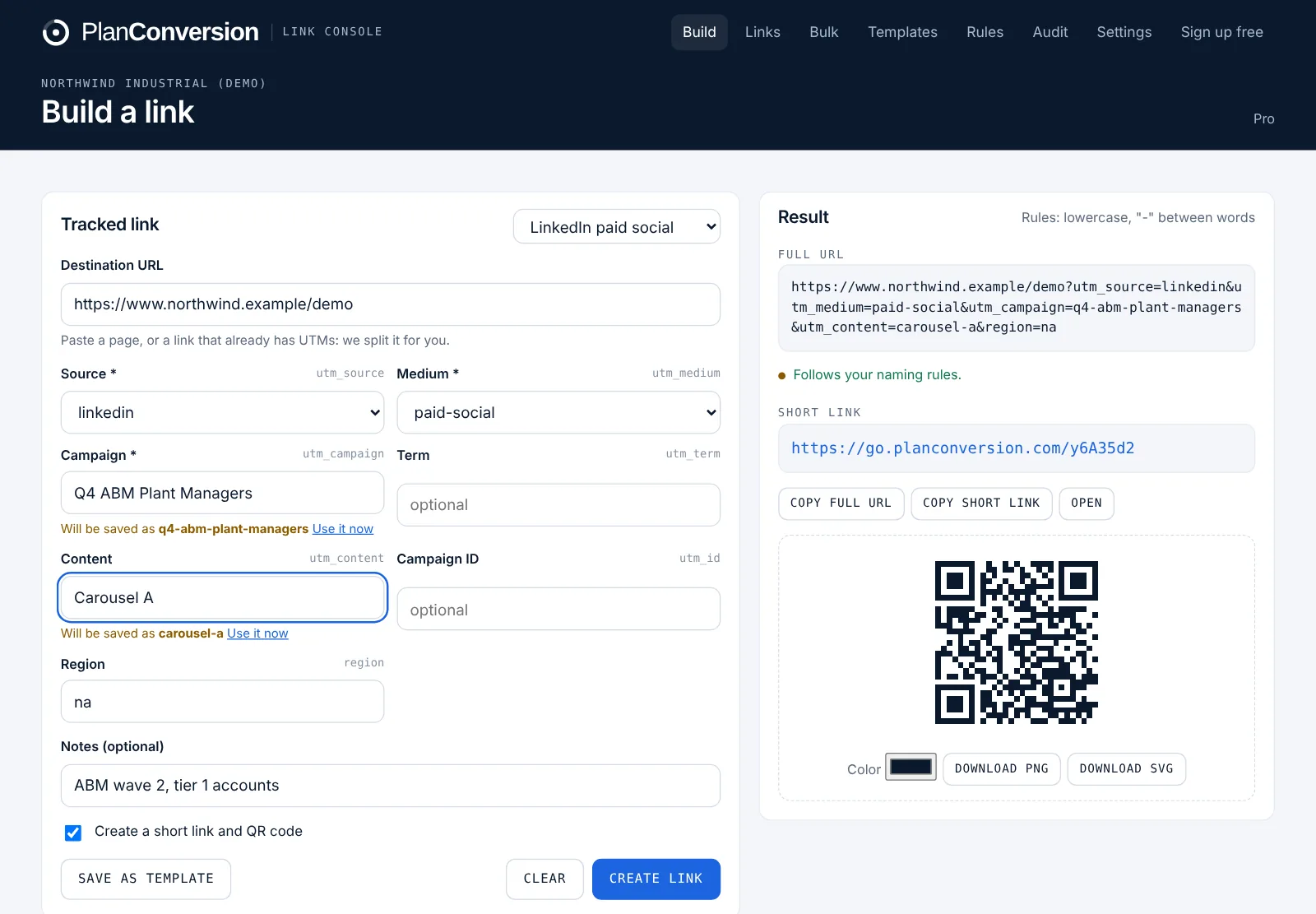
Governed links, without the spreadsheet
Built from the UTM taxonomies we set up for enterprise B2B clients, where one inconsistent value can split a campaign across five rows in GA4. Open any feature for how it works, who it is for and its plan.
Naming rules and approved values
Live cleaning to your convention, approved values, locked and required parameters, paste-and-split and templates.
Team workflow and approvals
Value requests approved once for everyone, roles, invite links, shared history, an overview dashboard and an activity log.
Short links and QR codes
Short links with click counts, editable destinations, a QR code designer, custom endings and your own branded domain.
Bulk builder and spreadsheet import
Build hundreds of links from a CSV, add custom parameters and fix the UTM spreadsheet you already have.
Ad account link audit
An hourly, read-only check of every live Google Ads and Microsoft Ads final URL, tracking template and URL suffix.
Link health monitor
Daily checks of every saved destination for 404s, errors, long redirect chains and redirects that strip UTMs.
Attribution check for GA4 and CRM
See which source, medium and campaign values break the convention in GA4, HubSpot, Salesforce or Pipedrive, and what they hold.
API, webhooks and Chrome extension
A REST API with workspace keys, outgoing webhooks for Zapier and Make, and a Chrome extension on every plan.
See it before you sign up
Screens from the live product with sample data from a fictional manufacturer.
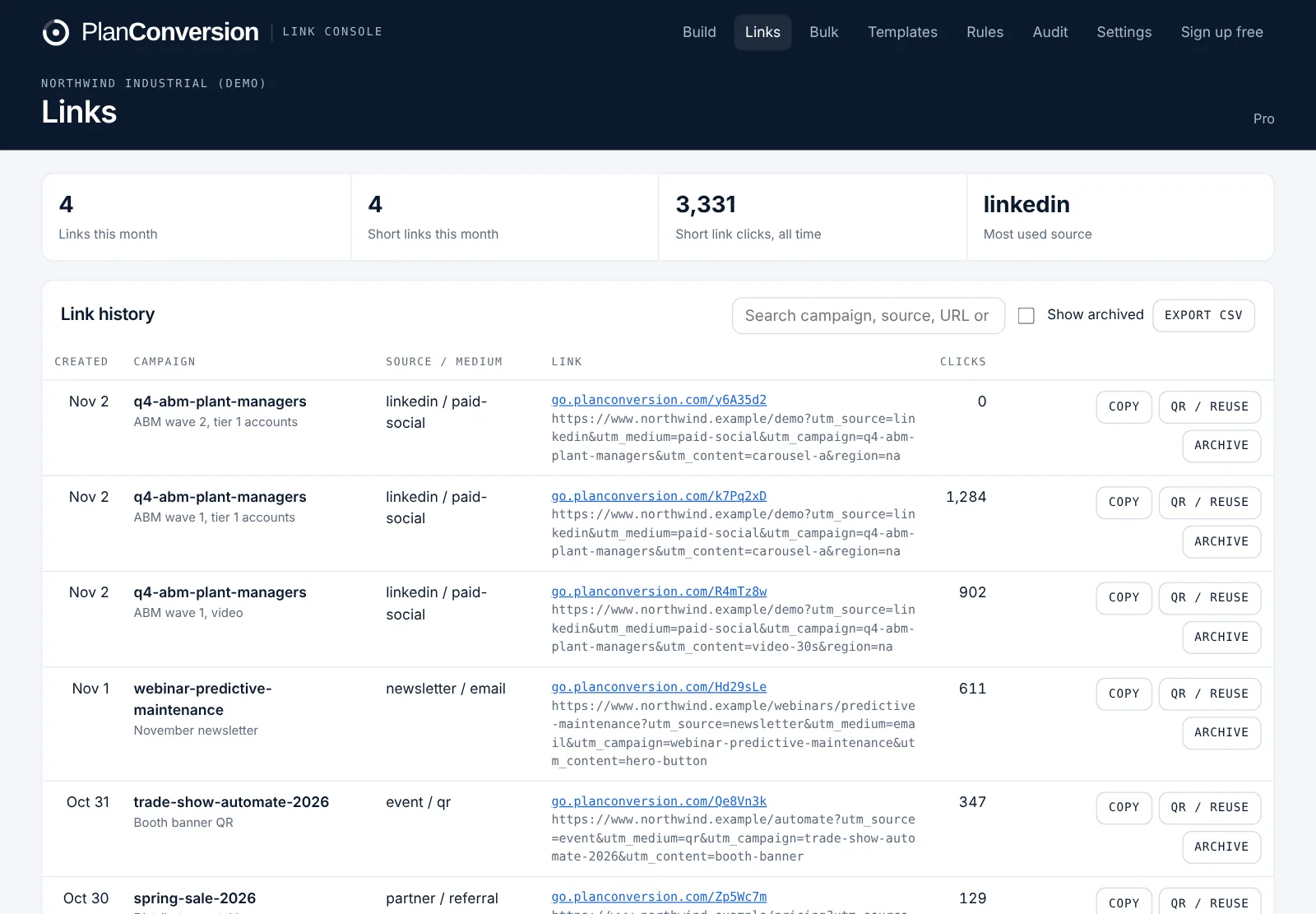
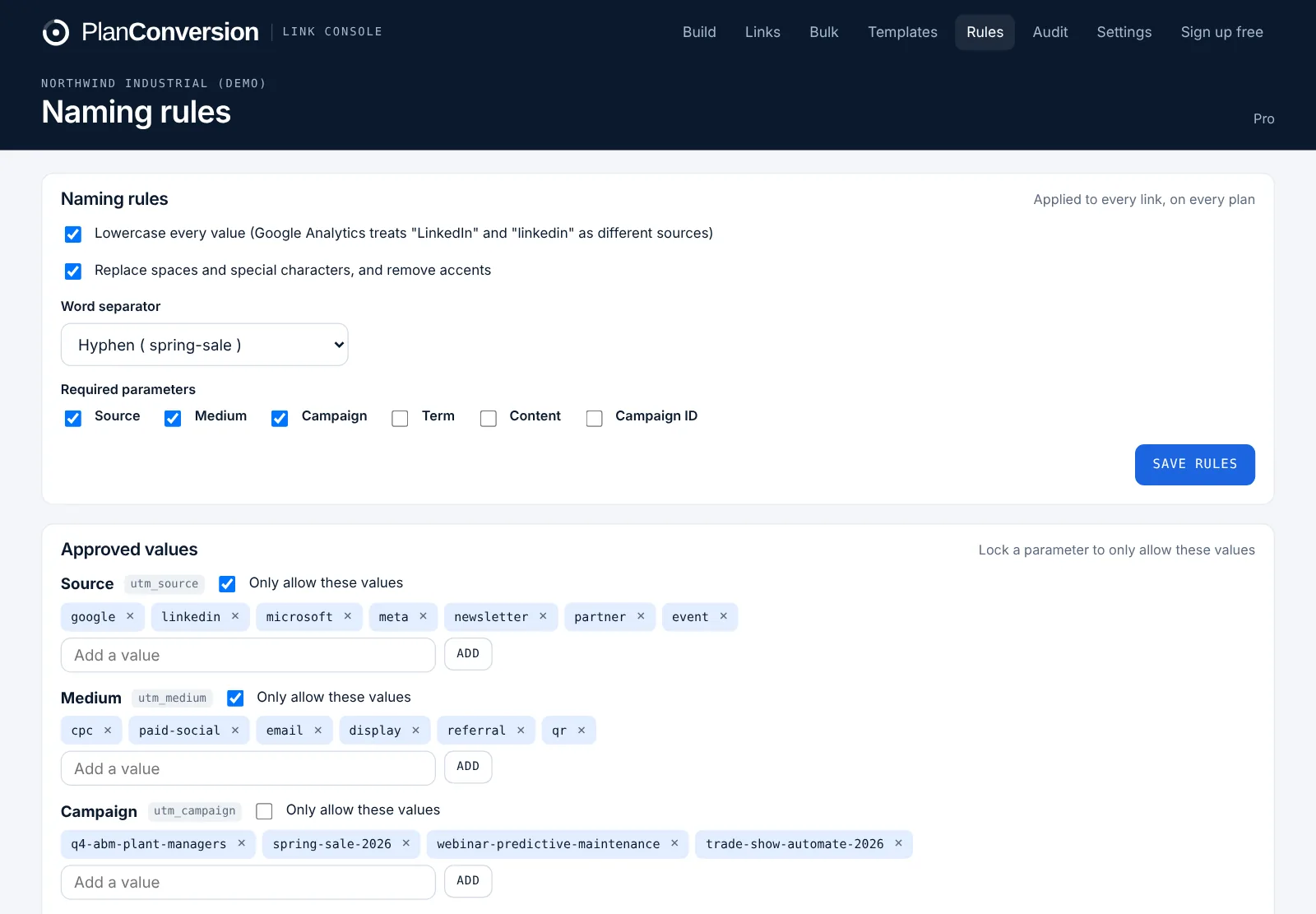
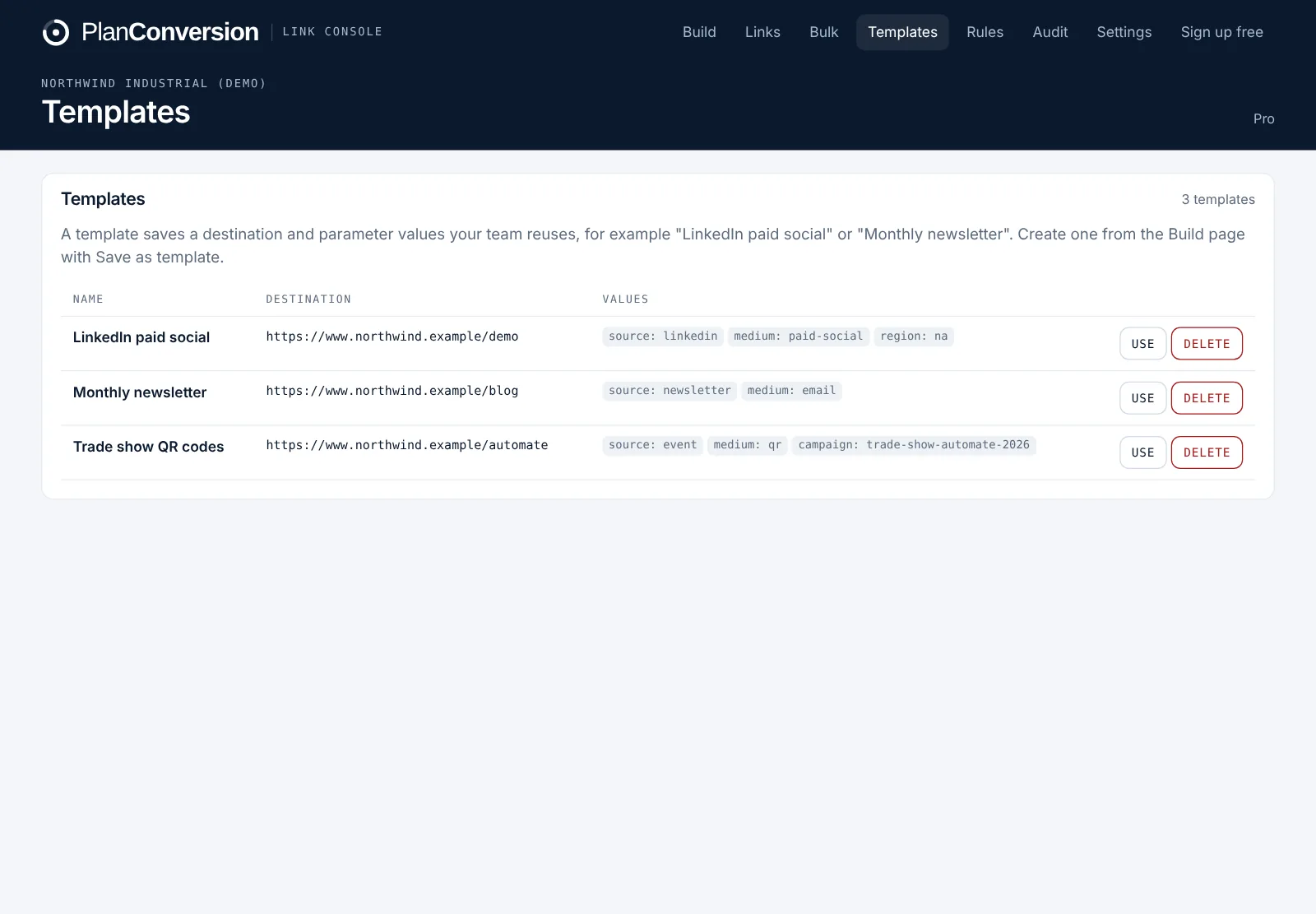
What the rules do to a value
Rules run in the builder, the bulk builder, the Chrome extension and the ad account audit, so every link follows the same convention.
linkedinGA4 is case sensitive: “LinkedIn” and “linkedin” are two sources.
spring-sale-2026-quebecSpaces, slashes and accents become one separator.
paid-socialLocked to the approved medium list your team agreed on.
{campaignid}Platform placeholders are left as they are.
Bulk links, custom parameters and a check of your live ads
Every workspace starts with 2 months of Pro free, then it is $49 USD per workspace per month with 10 users included.
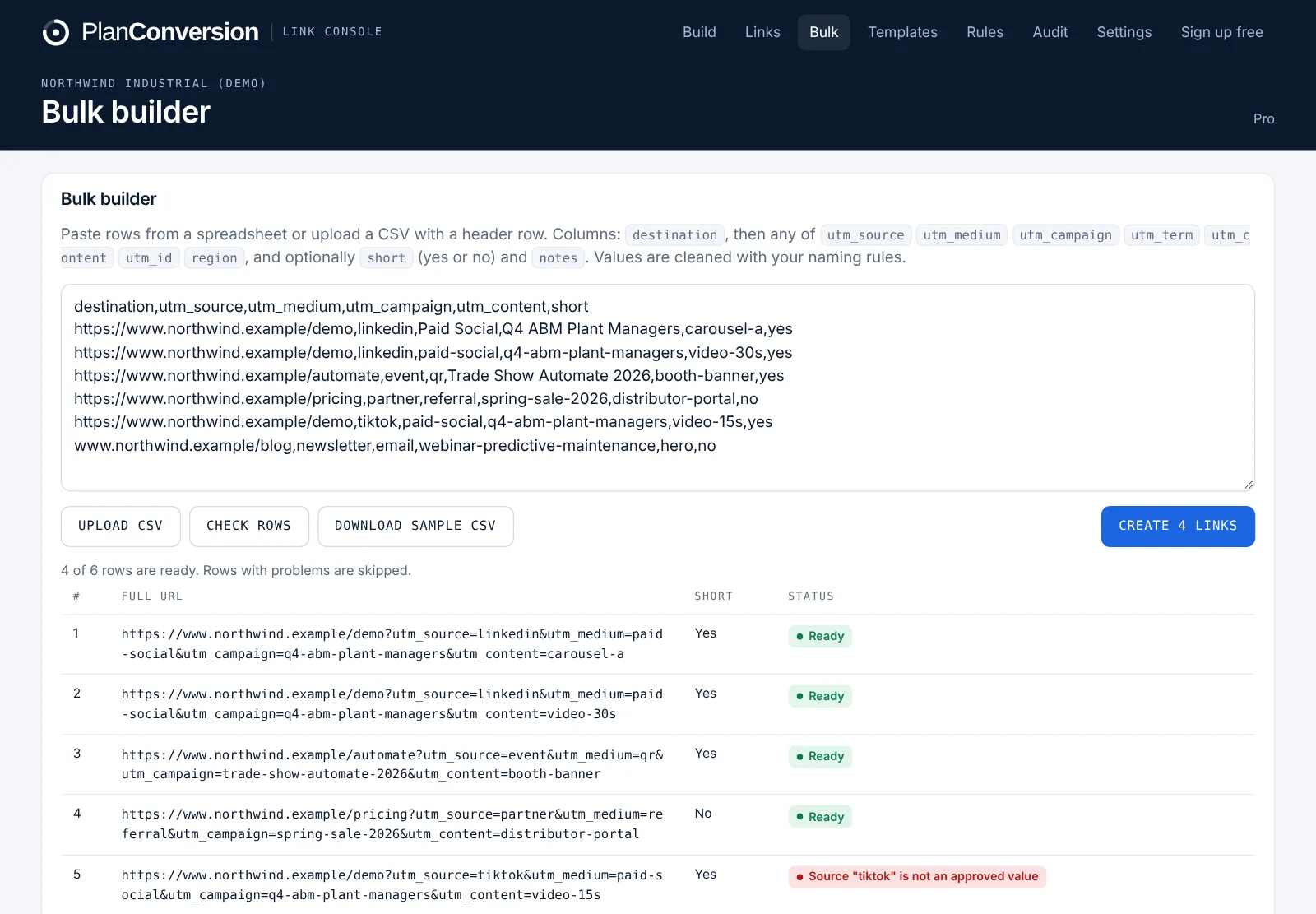
Bulk builder from a CSV
Paste rows from a spreadsheet or upload a CSV, and every row is cleaned and checked against your rules before anything is created. Rows with problems are skipped and explained, and the results download as a CSV with full and short links.
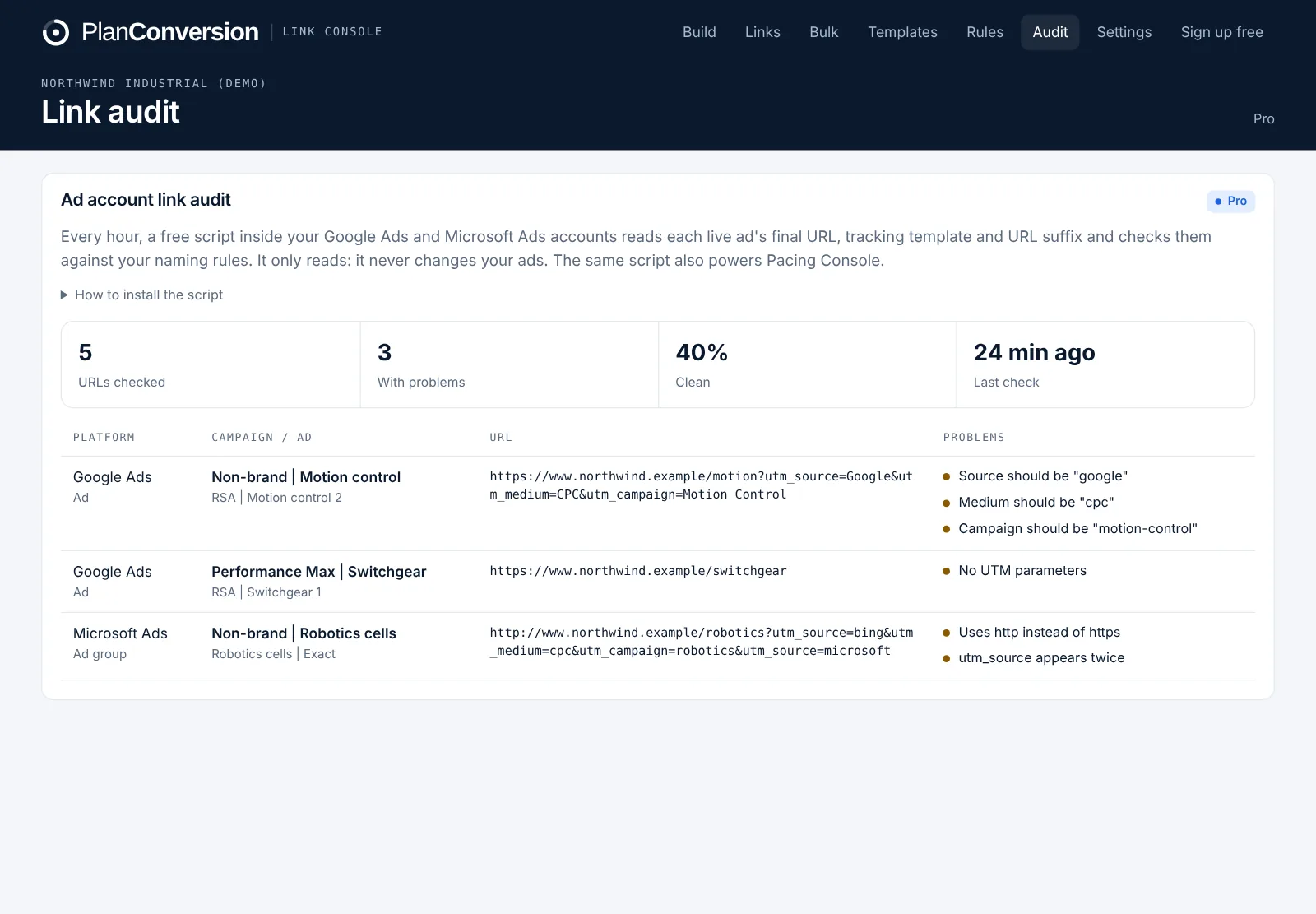
Ad account link audit
A free, read-only script in your Google Ads and Microsoft Ads accounts reads each live ad’s final URL, tracking template and URL suffix every hour and checks them against your rules: untagged ads, uppercase or misspelled values, http links and parameters that appear twice. The same script runs Pacing Console, and it updates itself: paste it once and each run loads the latest version.
Free
- Unlimited links, built with live cleaning, paste-and-split and naming rules
- Approved values, locked and required parameters
- Value requests and approvals
- 100 short links a month, editable destinations and the QR designer
- 5 templates, the Chrome extension and the GA4 export check
- Roles, history and CSV export
Pro
- Everything in Free
- $5 USD per extra user per month
- Unlimited short links and templates
- Custom endings, an optional branded short domain and a logo in QR codes
- Bulk builder and custom parameters
- Google Ads and Microsoft Ads link audit
- Link health monitor and HubSpot, Salesforce and Pipedrive checks
- REST API and webhooks for Zapier and Make
Enterprise
- Everything in Pro, for unlimited workspaces
- Taxonomy designed and set up for you
- Bundled with Pacing Console Enterprise
- Invoice billing, security review and data processing agreement
- SSO on request
Short links on your own domain, set up with one DNS record
Optional on Pro: your short links read go.yourcompany.com instead of go.planconversion.com. Links on your own domain earn more trust and more clicks, are less likely to be flagged as spam, keep a vendor name off your ads and print, and stay yours if you ever switch tools. Add one CNAME record at your DNS provider and the domain switches on automatically within minutes.
Every new workspace starts on Link Console Pro for 2 months, with no credit card. The workspace owner decides whether to keep Pro when the trial ends. If not, the workspace moves to Free and keeps every link, rule and template, and short links keep working. Using Pacing Console too? Both products on Pro are $79 USD per workspace per month with 10 users included ($5 per extra user), and Enterprise for both is $28 USD per user per month, billed annually, from 25 users. Sales tax may apply.
Your first governed link in two minutes
Create a free workspace
Sign up with your work email. You get a private workspace with sensible rules already on: lowercase, hyphens, source, medium and campaign required.
Add your approved values
List the sources and mediums your team uses and lock them. Add campaigns as you go; they appear as suggestions for everyone.
Build and share
Build a link, copy the short link or download the QR code. Save templates for the links you make every week, and invite your team.
Turn on the audit
On Pro, paste the read-only script in Google Ads and Microsoft Ads and schedule it hourly. Problems in live ads show up in the Audit tab.
For teams whose reports depend on clean UTMs
Marketing operations and analytics
Enforce one taxonomy across every team and agency, and stop cleaning source and medium in GA4, HubSpot or Salesforce after the fact.
Demand generation teams
Launch campaigns across LinkedIn, Google, email, events and partners with links that roll up correctly to campaign and channel reporting.
Agencies and consultants
Give each client a workspace with its own rules and values, and hand over a clean link history at the end of every engagement.
Event and field marketing
Short links and QR codes for booths, print and slides, with click counts, all tagged to the same convention as digital campaigns.
How it compares with the usual options
| Spreadsheet | Bitly | UTM.io | Link Console | |
|---|---|---|---|---|
| Cost to start | Free, with manual work | Free: 5 links and 2 QR codes a month | Free Starter plan | Free for up to 3 users, unlimited links |
| Naming rules and approved values | Formulas, easy to bypass | Not listed on its pricing page | Limited rules from Plus ($19 a month); all standard UTMs from Professional ($69) | Every plan |
| Value requests and approvals | Email threads | Not listed | Not listed | Every plan |
| Short links | No | Core $10 a month: 100 links; Growth $29: 500 links | UTM.guru shortener; branded shorteners from Plus | 100 a month free; unlimited on Pro ($49) |
| Users | Anyone with the file | - | Unlimited on every plan | 3 on Free; 10 on Pro, then $5 per extra user |
| Editable QR codes | No | 5 to 200 QR codes a month by plan | Dynamic QR codes | Every plan, with a designer |
| Audit of live Google Ads and Microsoft Ads URLs | No | Not listed | Not listed | Pro, hourly |
| Broken links and GA4 or CRM drift | No | Not listed | UTM cleaner on Business ($159) | Pro; GA4 export check free |
| Ties to budget pacing | No | No | No | Same account as Pacing Console |
Competitor facts from Bitly’s and UTM.io’s own pricing pages, checked November 2, 2026; Bitly’s paid plans are billed annually. Detailed comparisons:
Questions about Link Console
Read the guide: UTM naming conventions for B2B teams, and how to enforce them.
What is a UTM builder?
A UTM builder adds tracking parameters (utm_source, utm_medium, utm_campaign, utm_term and utm_content) to a link so analytics tools such as GA4 know where each visit came from. Link Console also applies your naming rules, so every link uses the same values.
Why do UTM naming rules matter?
Analytics tools treat every spelling as a different value. “LinkedIn”, “linkedin” and “linked-in” become three sources, and campaign reports split or go missing. Rules applied when the link is built prevent it.
Is Link Console really free?
Yes. The builder, naming rules, approved values, locked and required parameters, value requests and approvals, 5 templates, 100 short links a month with editable destinations and the QR designer, the GA4 export check, the Chrome extension, the link history and up to 3 users are free forever. Pro adds 10 users ($5 per extra user), unlimited short links and templates, custom endings and an optional branded short domain, the bulk builder and custom parameters, the ad account audit, the link health monitor, CRM checks and the API for $49 USD per workspace per month, and every workspace starts with 2 months of Pro free.
Can teammates and agencies add new values?
They request them from the builder. The workspace owner approves once and the value is added to the approved list for everyone, free on every plan.
Do short links keep working on the Free plan?
Yes. Short links you created keep redirecting and counting clicks. Free only limits how many new short links you create each month.
How does the ad account audit work?
A free script inside your Google Ads and Microsoft Ads accounts reads each live ad’s final URL, tracking template and URL suffix and sends them to Link Console, which checks them against your rules every hour. It only reads; it never changes your ads.
Does it work with GA4, HubSpot and Salesforce?
Yes. Link Console writes standard UTM parameters, which GA4, Adobe Analytics, HubSpot, Salesforce and most marketing tools read. Custom parameters, such as Adobe’s cid or a region code, are available on Pro.
Is it the same account as Pacing Console?
Yes. One PlanConversion login and workspace work in both. Each product has its own free plan and its own 2-month Pro trial.
Tag your next link the right way
Create a free workspace, set your rules once and every link your team builds follows them.