Pipeline plan
UTM naming rules that apply themselves, on every plan
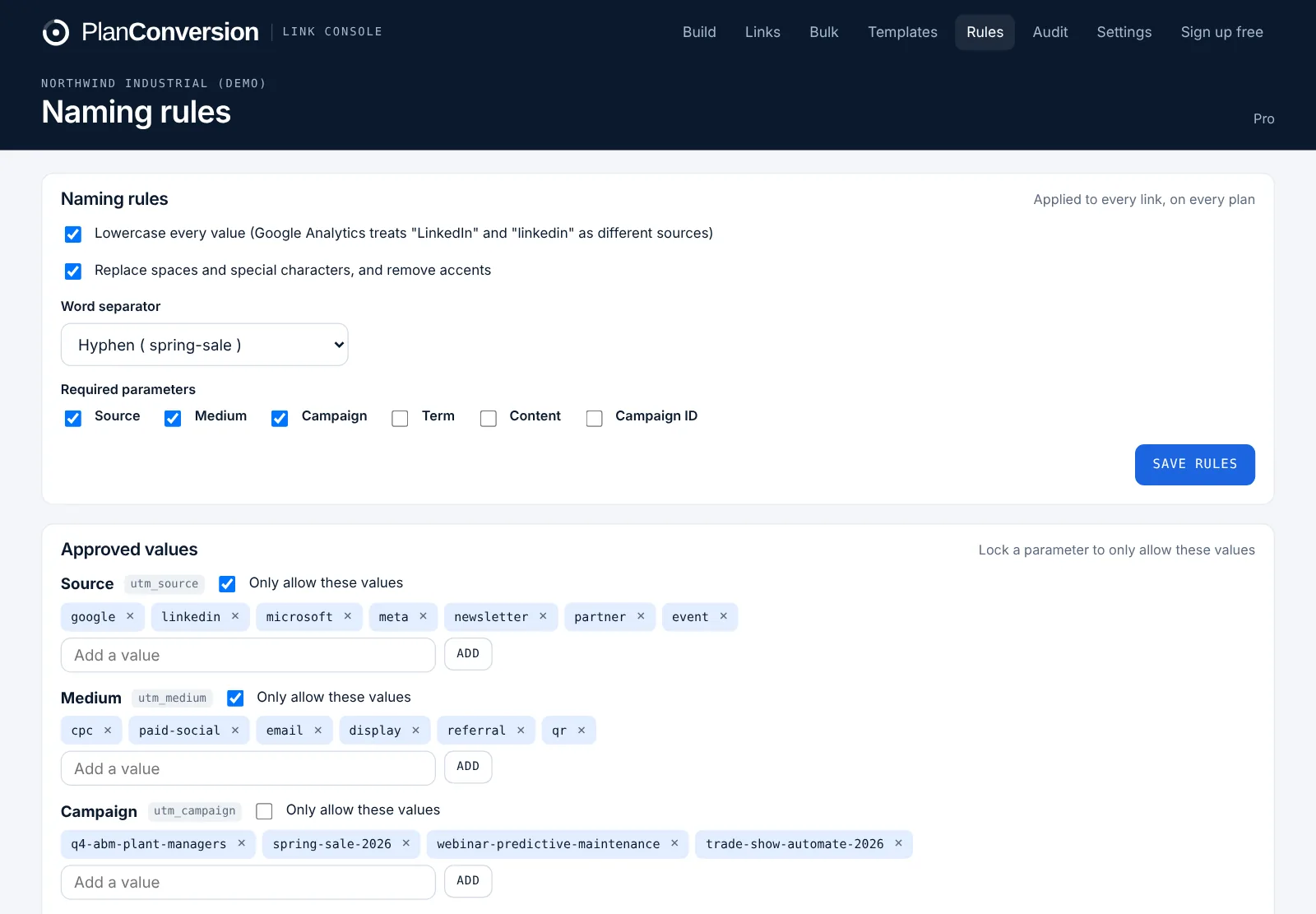
Link Console enforces your UTM naming convention while the link is being built. Values are cleaned as people type (lowercase, one word separator, accents and stray symbols removed), source and medium come from approved lists, locked parameters cannot be edited and required parameters cannot be skipped. Rules, approved values, locked and required parameters are free on every plan.
Plan: Free on every plan. Templates: 5 on Free, unlimited on Pro.
Last updated
What it does
- Cleans every value to your convention as people type: lowercase, your separator (hyphen or underscore), accents and symbols removed
- Approved values for source, medium, campaign or any parameter, picked from a menu instead of typed from memory
- Locked parameters that keep a fixed value, such as utm_medium=paid-social on a LinkedIn template
- Required parameters, so a link without source, medium or campaign cannot be saved
- Paste-and-split: paste an existing tagged link, see each parameter in its own field, cleaned and checked
- Templates for the links you build every week (5 on Free, unlimited on Pro)
How it works
Set the convention once
Choose lowercase, the word separator and which parameters are required. Sensible defaults are on from the first sign-in.
Add approved values
List the sources and mediums your team uses and lock them. Campaign values can stay open or follow a list.
Build or paste
Type into the builder or paste an existing link. Every value is cleaned on the spot and anything off-convention is flagged before the link exists.
Save it as a template
Save the destination and values for a channel or program so the next link takes seconds and matches the last one.
Who it is for
Marketing operations
Stop cleaning source and medium in GA4, HubSpot or Salesforce after the fact. The convention is applied before the link is shared.
Demand generation leads
Every channel owner builds links the same way, so campaign and channel reports roll up without manual mapping.
Agencies
Give each client its own rules and approved values, and stop arguing about whether it was “LinkedIn” or “linkedin”.
Are naming rules really free?
Yes. Rules, approved values, locked parameters and required parameters are on every plan, including Free. Pro adds unlimited templates, bulk building and custom parameters.
What happens to platform placeholders such as {campaignid}?
They are left exactly as they are, so Google Ads and Microsoft Ads ValueTrack and dynamic parameters keep working.
Can I paste links built in another tool?
Yes. Paste-and-split reads any tagged URL, puts each parameter in its own field, cleans the values and flags what breaks your rules.
Why does case matter in UTMs?
GA4 and most CRMs treat “LinkedIn” and “linkedin” as two different sources, which splits reports. Forcing lowercase at build time prevents it.
More features
Team workflow and approvals
Value requests approved once for everyone, roles, invite links, shared history, an overview dashboard and an activity log.
Short links and QR codes
Short links with click counts, editable destinations, a QR code designer, custom endings and your own branded domain.
Bulk builder and spreadsheet import
Build hundreds of links from a CSV, add custom parameters and fix the UTM spreadsheet you already have.
Ad account link audit
An hourly, read-only check of every live Google Ads and Microsoft Ads final URL, tracking template and URL suffix.
Link health monitor
Daily checks of every saved destination for 404s, errors, long redirect chains and redirects that strip UTMs.
Attribution check for GA4 and CRM
See which source, medium and campaign values break the convention in GA4, HubSpot, Salesforce or Pipedrive, and what they hold.
API, webhooks and Chrome extension
A REST API with workspace keys, outgoing webhooks for Zapier and Make, and a Chrome extension on every plan.
Enterprise and security
Per-user Enterprise from 25 users: isolated workspaces, approvals, a full change log, Canadian hosting, invoice billing and setup by PlanConversion.
Try Link Console free
Free forever, and every new workspace starts with 2 months of Pro. No credit card.