Pipeline plan
Bulk UTM links, and a clean-up for the spreadsheet you already have
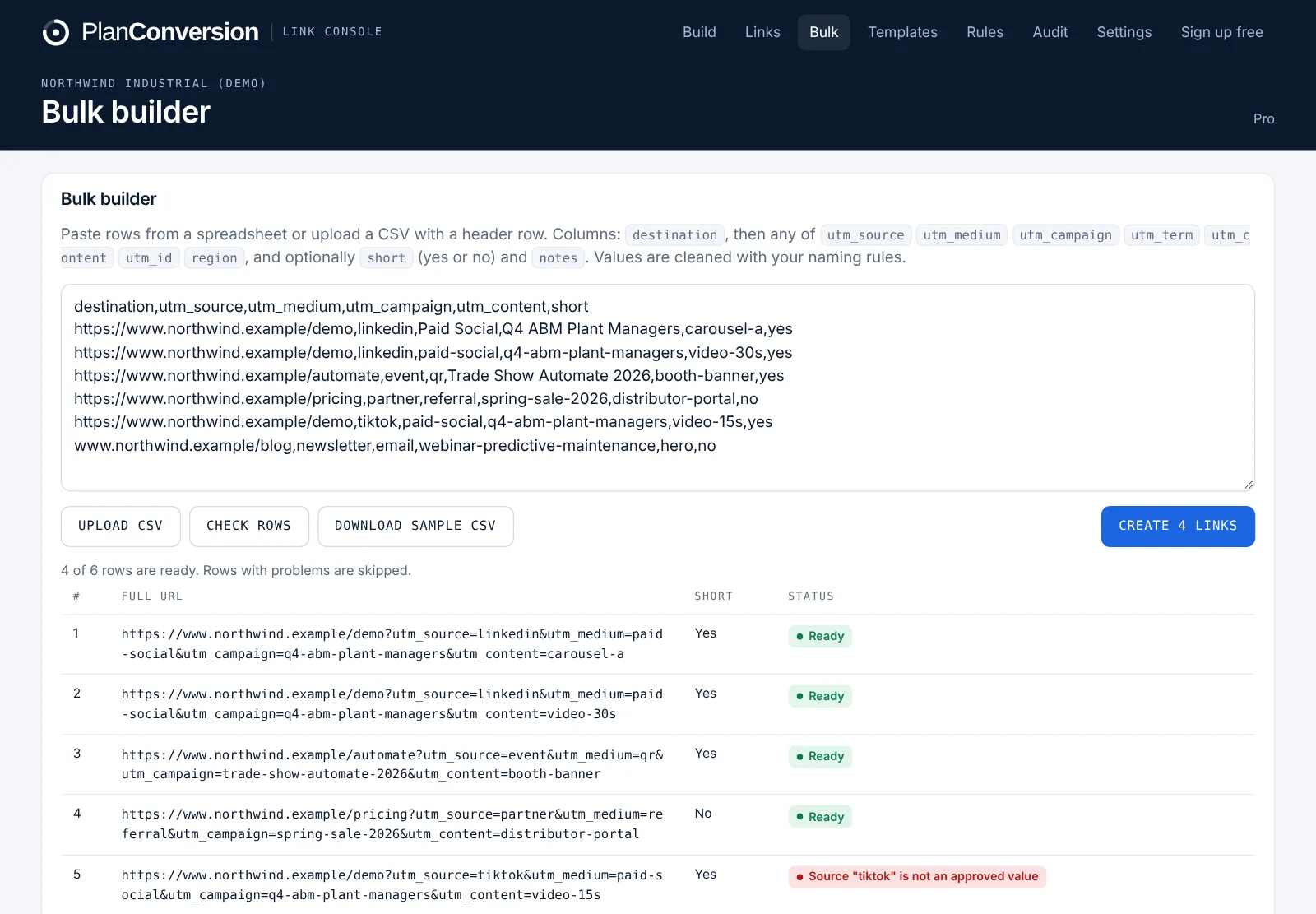
Link Console builds tagged links in bulk from a CSV or rows pasted from a spreadsheet, checking every row against your naming rules before anything is created. Custom parameters beyond the five UTMs (such as Adobe cid or a region code) are available on Pro. If your team already keeps a UTM spreadsheet, upload it: Link Console shows what breaks the convention, gives you a fixed version to download and imports the links into the shared history.
Plan: Bulk builder and custom parameters on Pro. Spreadsheet import and check works from the workspace on any plan.
Last updated
What it does
- Bulk builder from a CSV upload or rows pasted from Excel or Google Sheets (Pro)
- Every row cleaned and checked against your rules; rows with problems are skipped and explained
- Results download as a CSV with full and short links
- Custom parameters beyond utm_source, utm_medium, utm_campaign, utm_term and utm_content (Pro)
- Spreadsheet import and check: upload an existing UTM sheet and see every value that breaks the convention
- Download a fixed version and import the links into the shared history so nothing starts from zero
How it works
Paste or upload
Paste rows from a spreadsheet or upload a CSV with destinations and values.
Review the check
Each row is cleaned to the convention. Rows that cannot be fixed automatically are listed with the reason.
Create or fix
Create the links in one go, or for an old sheet, download the corrected version.
Import the history
Bring existing links into Link Console so the team searches one history instead of five spreadsheets.
Who it is for
Teams moving off spreadsheets
Keep years of links: import the sheet, fix what breaks the convention and carry on in one shared history.
Paid media and ABM
Build links for dozens of ads, accounts or regions in one upload, all on the same convention.
Analytics teams on Adobe or custom stacks
Add parameters beyond UTMs, such as cid or region, with the same rules applied.
How many rows can I build at once?
The bulk builder is made for campaign launches with many links at once. Rows are checked one by one and problems are explained, so a few bad rows never block the rest.
Which columns does the CSV need?
A destination URL and the parameter values you use. Link Console maps them to your parameters and applies your rules to each value.
Will importing my old sheet change my live links?
No. The check only reads the sheet. You decide whether to download the fixed version and whether to import links into the history.
Are custom parameters available on Free?
No. Custom parameters and the bulk builder are on Pro, which every workspace can use free for its first 2 months.
More features
Naming rules and approved values
Live cleaning to your convention, approved values, locked and required parameters, paste-and-split and templates.
Team workflow and approvals
Value requests approved once for everyone, roles, invite links, shared history, an overview dashboard and an activity log.
Short links and QR codes
Short links with click counts, editable destinations, a QR code designer, custom endings and your own branded domain.
Ad account link audit
An hourly, read-only check of every live Google Ads and Microsoft Ads final URL, tracking template and URL suffix.
Link health monitor
Daily checks of every saved destination for 404s, errors, long redirect chains and redirects that strip UTMs.
Attribution check for GA4 and CRM
See which source, medium and campaign values break the convention in GA4, HubSpot, Salesforce or Pipedrive, and what they hold.
API, webhooks and Chrome extension
A REST API with workspace keys, outgoing webhooks for Zapier and Make, and a Chrome extension on every plan.
Enterprise and security
Per-user Enterprise from 25 users: isolated workspaces, approvals, a full change log, Canadian hosting, invoice billing and setup by PlanConversion.
Try Link Console free
Free forever, and every new workspace starts with 2 months of Pro. No credit card.