Pipeline plan
Free ad budget pacing, measured by the hour
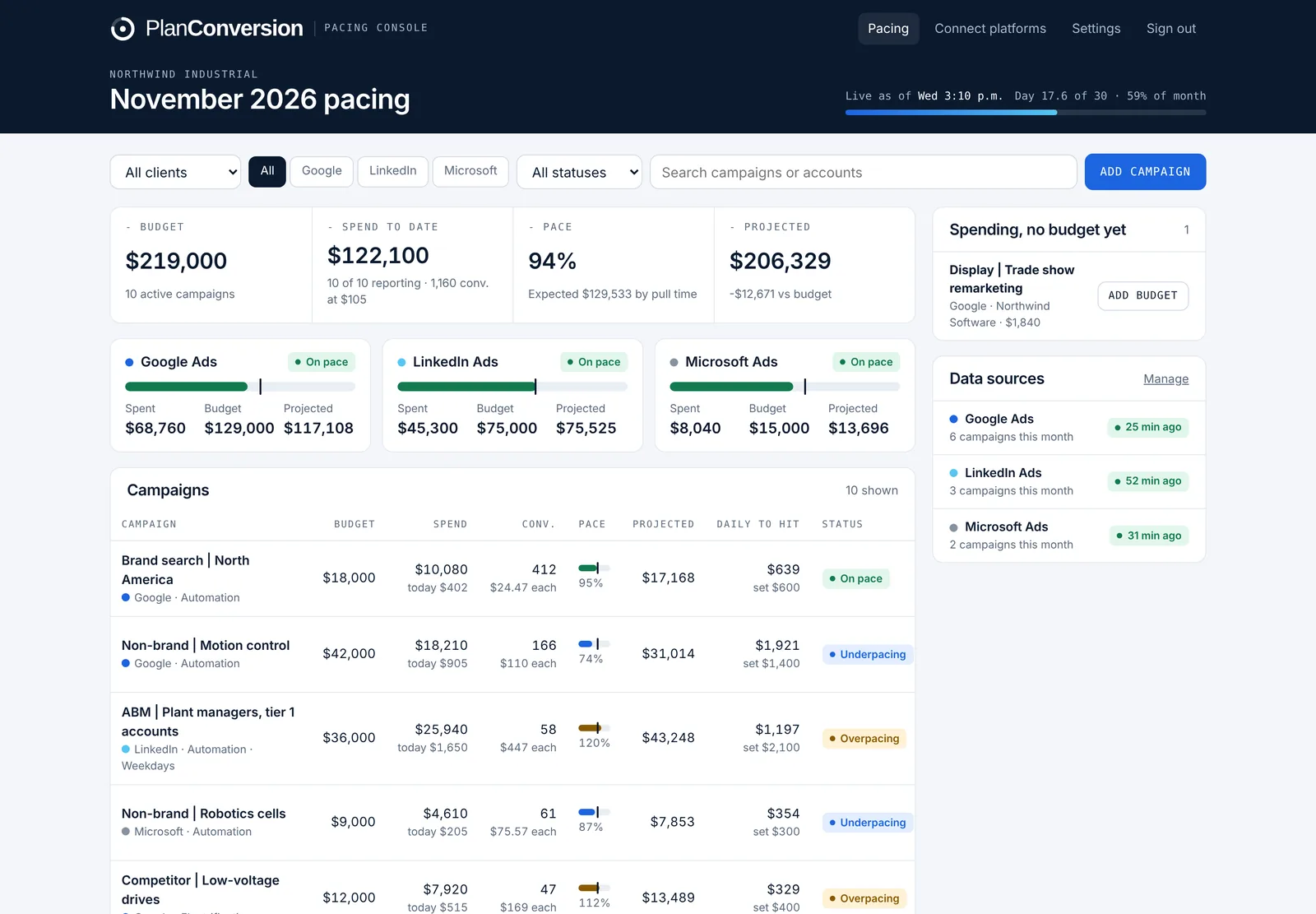
Pacing Console is a free tool from PlanConversion that tracks Google Ads, LinkedIn Ads and Microsoft Ads spend every hour against each campaign’s monthly budget. It compares spend with what should be spent by the hour the data was pulled, forecasts month-end spend and conversions, and gives the daily budget that lands each campaign on target.
Free. No credit card. Scripts run in your own ad accounts.
Last updated
Everything you need to stop overspending and underspending
Built from the pacing sheets we ran by hand for enterprise B2B clients, then turned into a tool anyone can use.
Cut-to-date pacing by the hour
Spend pulled at 3 pm is compared with what should be spent by 3 pm, not by end of day. A campaign is never flagged as behind just because the day is not over.
Month-end forecast
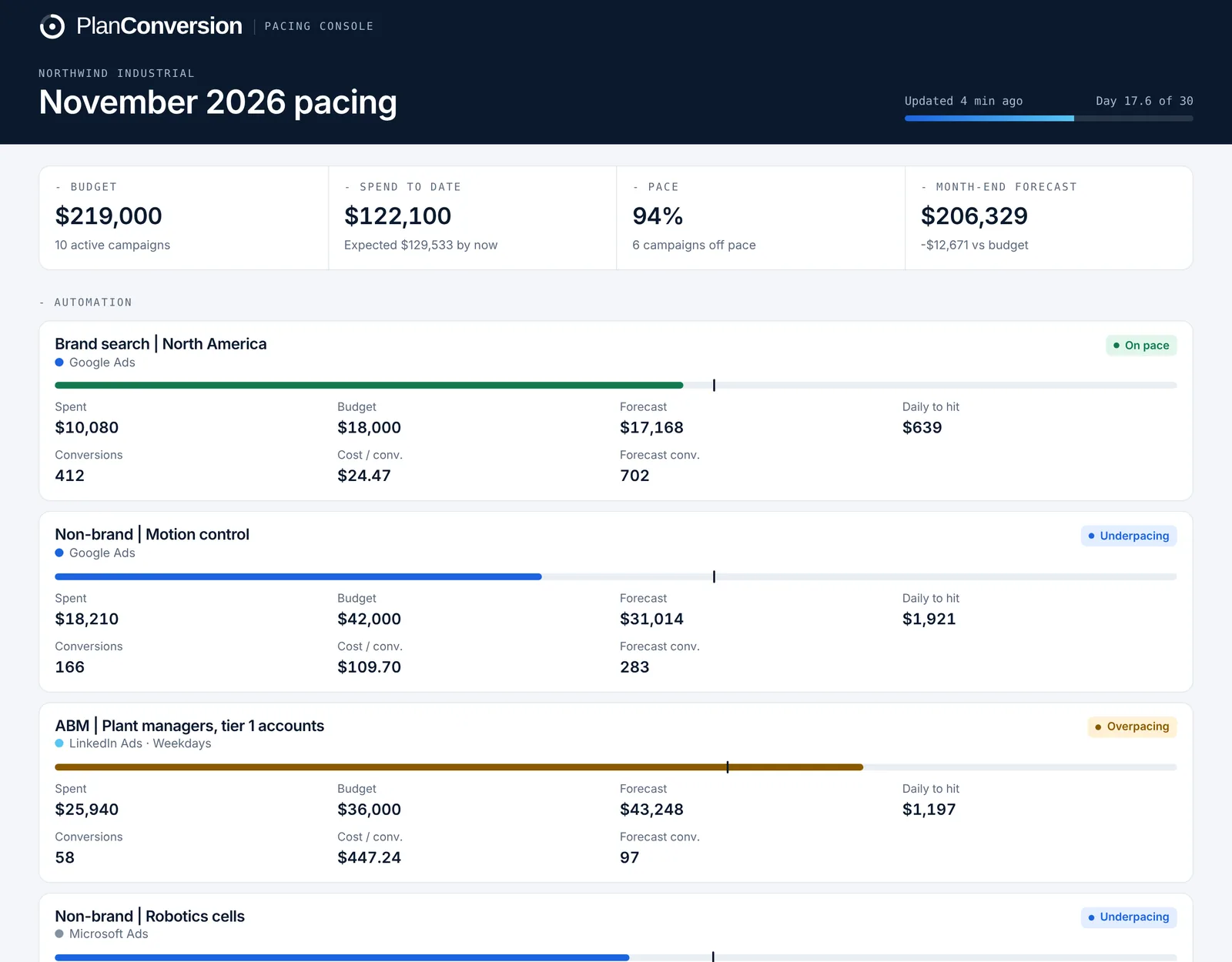
Every campaign, platform and the whole account show projected month-end spend at the current run rate, with the gap to budget in dollars.
Daily budget to hit
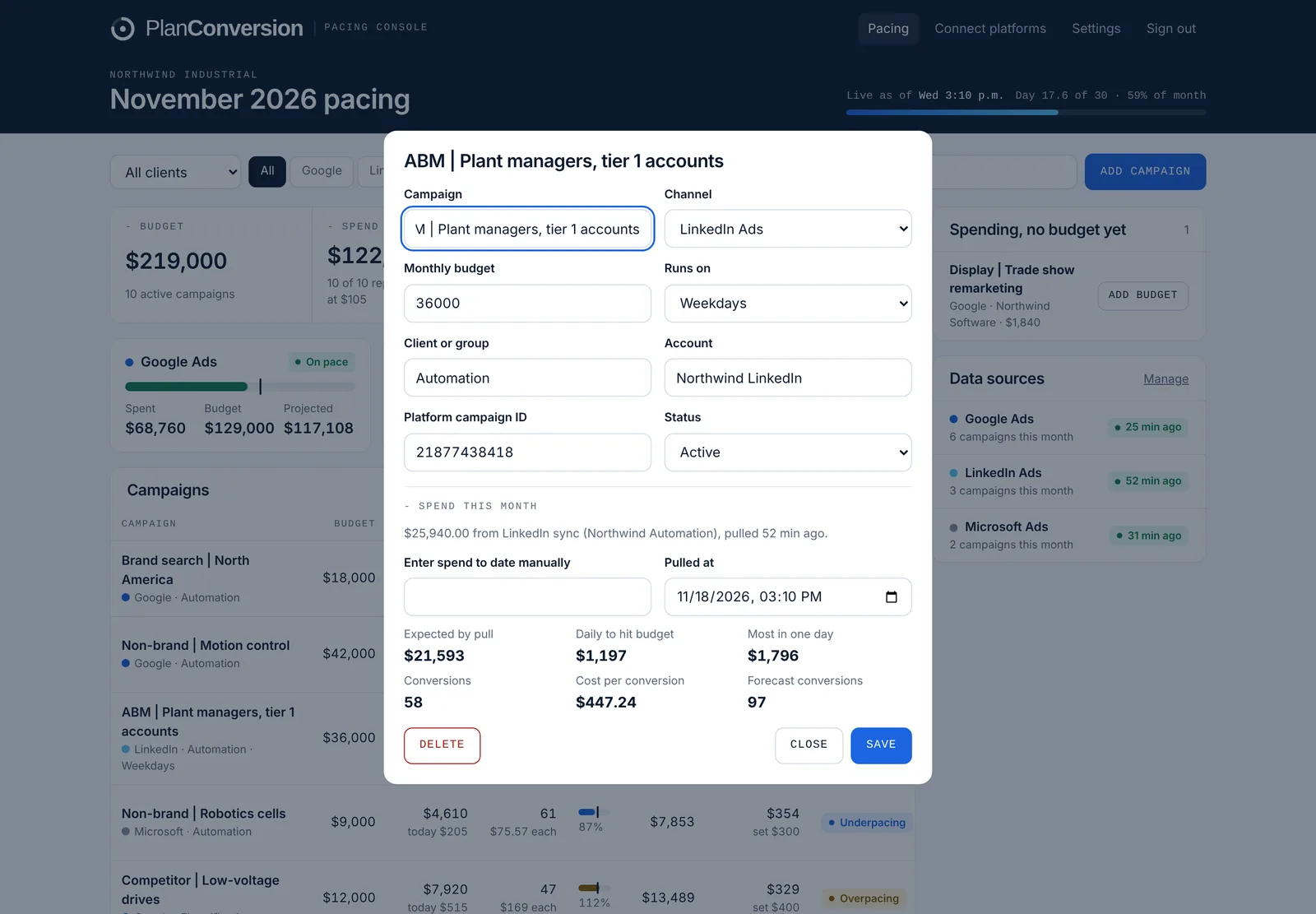
The exact daily budget that spends what is left by month end, plus the most the platform may spend in one day at that setting under its overdelivery rules (Google Ads allows up to 2x the average daily budget).
Conversions and cost per conversion
Conversions, cost per conversion and forecast conversions per campaign, from Google Ads, Microsoft Ads and LinkedIn (website conversions and lead form fills).
Weekday schedules
Campaigns that run Monday to Friday are paced on business days only, which is how most B2B LinkedIn programs actually spend.
Daily pacing email
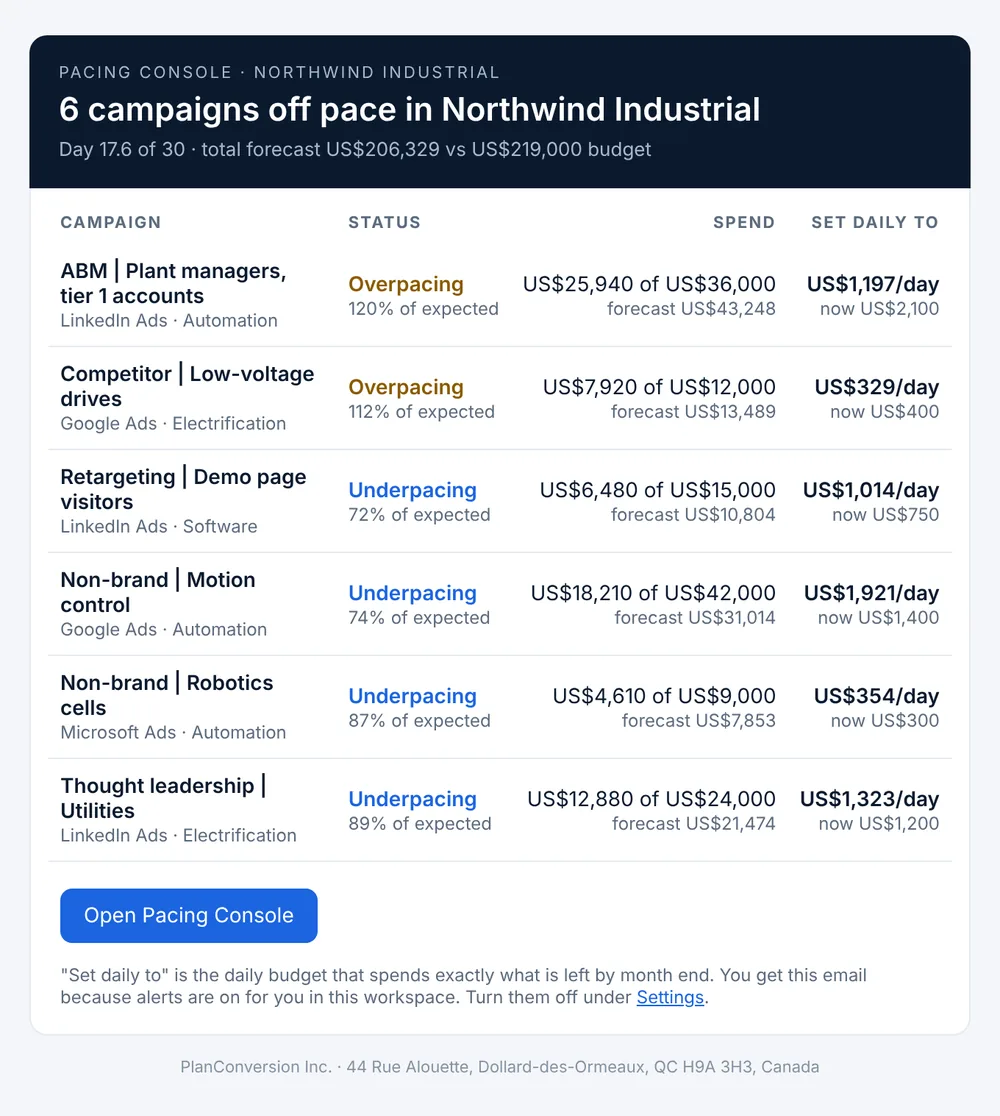
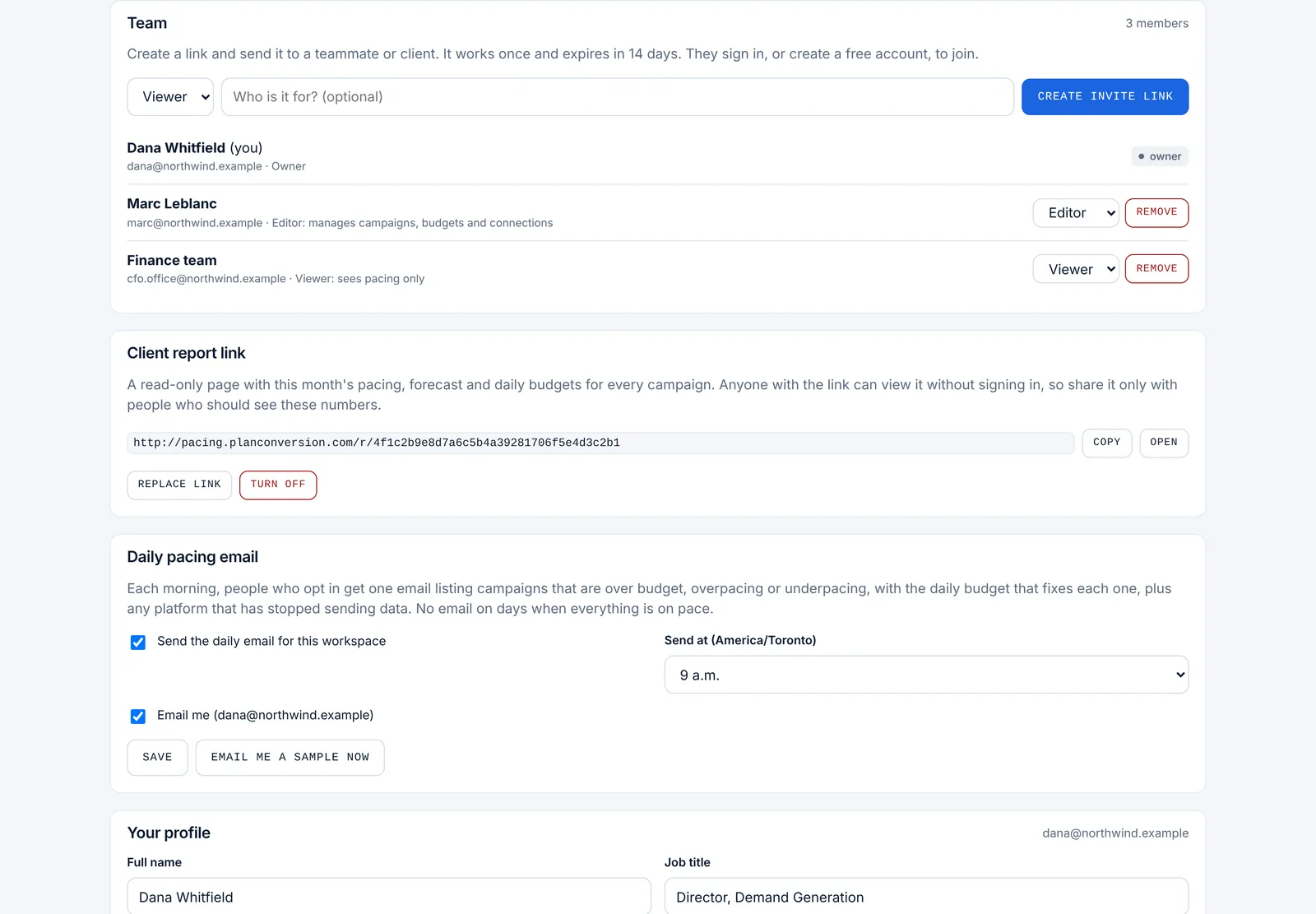
One email each morning with the campaigns that are over budget, overpacing or underpacing, and the daily budget that fixes each one. No email when everything is on pace.
Client and finance report link
A read-only page with live pacing, forecasts and cost per conversion that you can send to a client, a CFO or a procurement team. Turn it off or replace it anytime.
Team roles and stale-data warnings
Invite editors and viewers with one-time links. If a platform stops sending data, the board and the email say so, so pace is never judged on old numbers.
See it before you sign up
Screens from the live product with sample data from a fictional manufacturer.
Forecasts, recommendations and pipeline, not just pace
Pro adds the views finance and leadership ask for when budgets run into six or seven figures a month. Request it from inside the app.
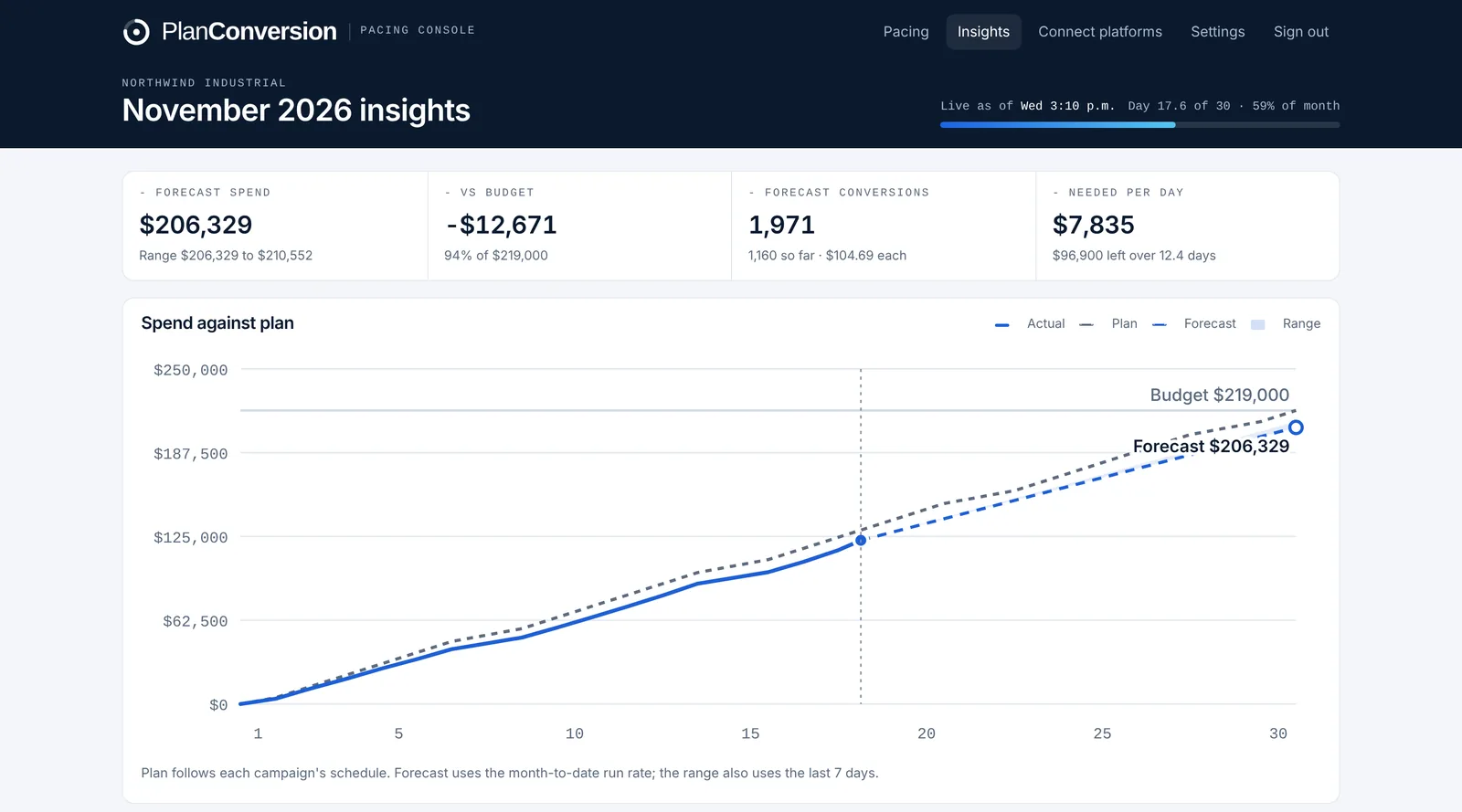
Spend against plan, with a forecast range
A burn-up chart of actual spend against each campaign’s schedule-aware plan, with the month-end forecast from the month-to-date run rate and a range from the last seven days. Daily spend by channel sits against the daily budget needed to land the month.
Recommendations with dollar impact
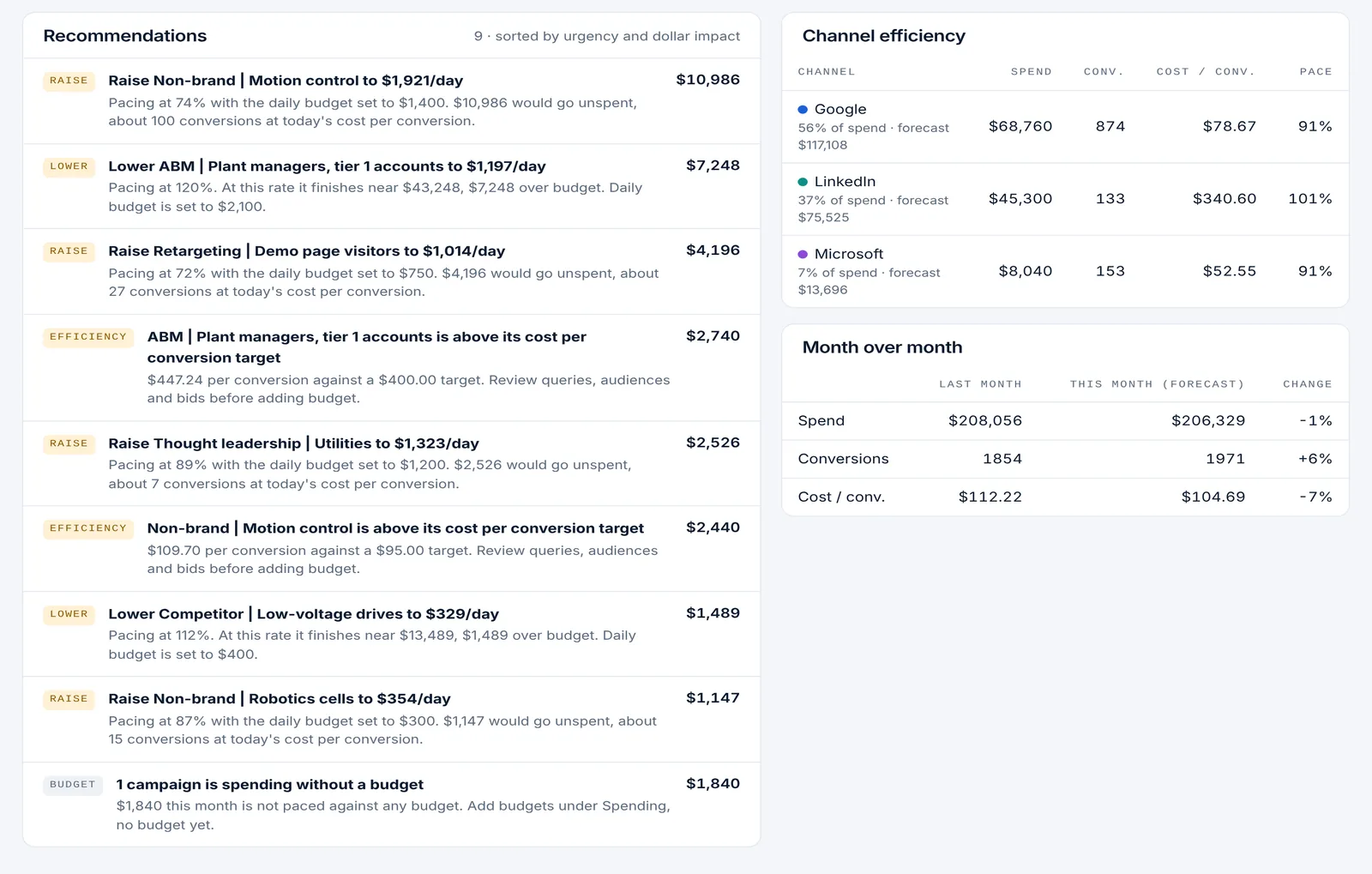
Every change worth making, sorted by urgency and dollars: daily budgets to lower or raise, money to move from campaigns that cannot spend to the ones that convert cheapest, campaigns above their cost per conversion target, and spend with no budget. Channel efficiency and month over month sit alongside.
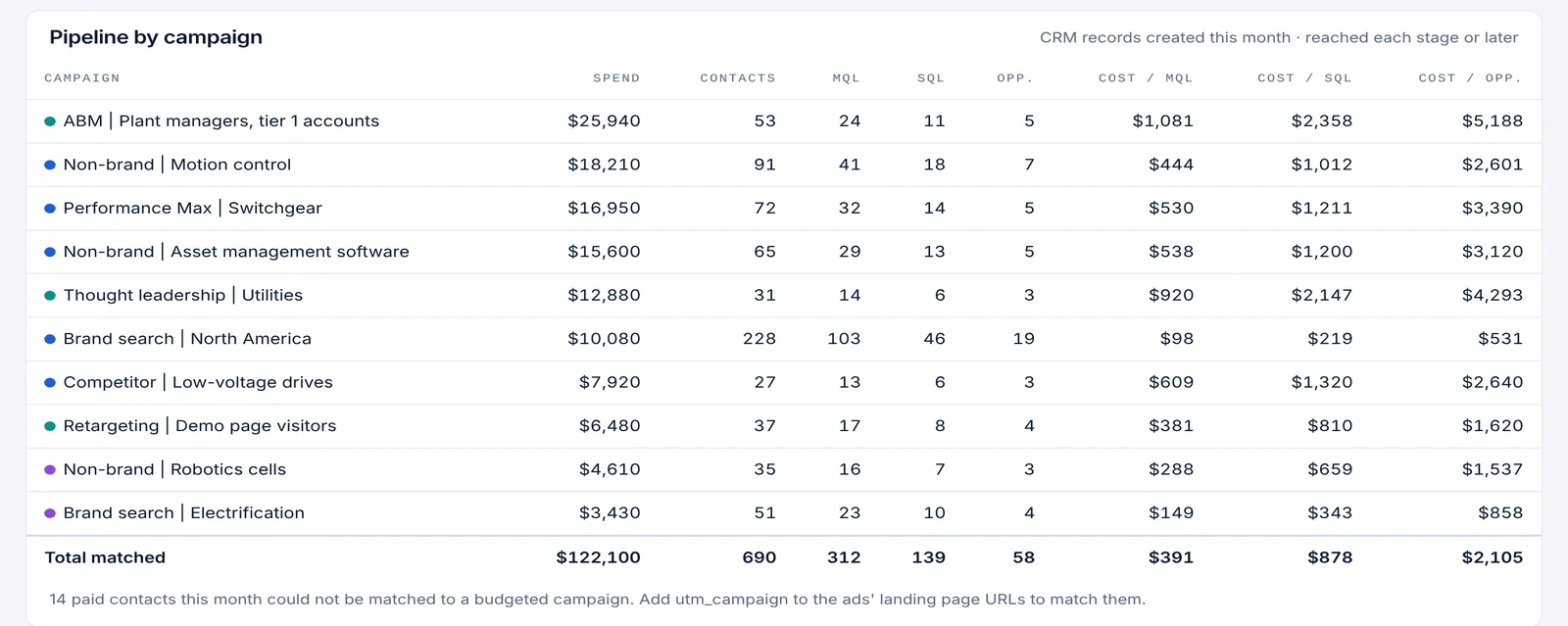
CRM lifecycle stages by campaign
Connect HubSpot, Salesforce or Pipedrive with read-only credentials, or bring any other CRM such as Microsoft Dynamics 365 or Zoho by CSV upload or API. Each campaign then shows the contacts it created this month and how many reached MQL, SQL, opportunity and customer, with cost per stage next to spend. Built-in connections refresh twice a day.
The math behind the pace and the forecast
No black box. Every number on the board comes from four formulas you can check by hand.
budget × elapsed active days ÷ active days in monthElapsed days count to the minute the data was pulled, in your time zone. Weekday campaigns count business days only.
spend to date ÷ expected spendInside 100% plus or minus your tolerance (10% by default) is on pace. Above is overpacing, below is underpacing.
spend to date ÷ elapsed days × active daysThe same run rate applied to conversions gives forecast conversions and a forecast cost per conversion.
budget left ÷ active days leftShown next to the daily budget set in the platform, so you can see how far off the setting is.
Example: a $30,000 campaign at 3 pm on day 18 of a 30-day month should have spent about $17,600. If it has spent $19,600, it is pacing at 111% and will finish near $33,400 unless the daily budget drops to about $840.
Live in about 15 minutes
Create a free workspace
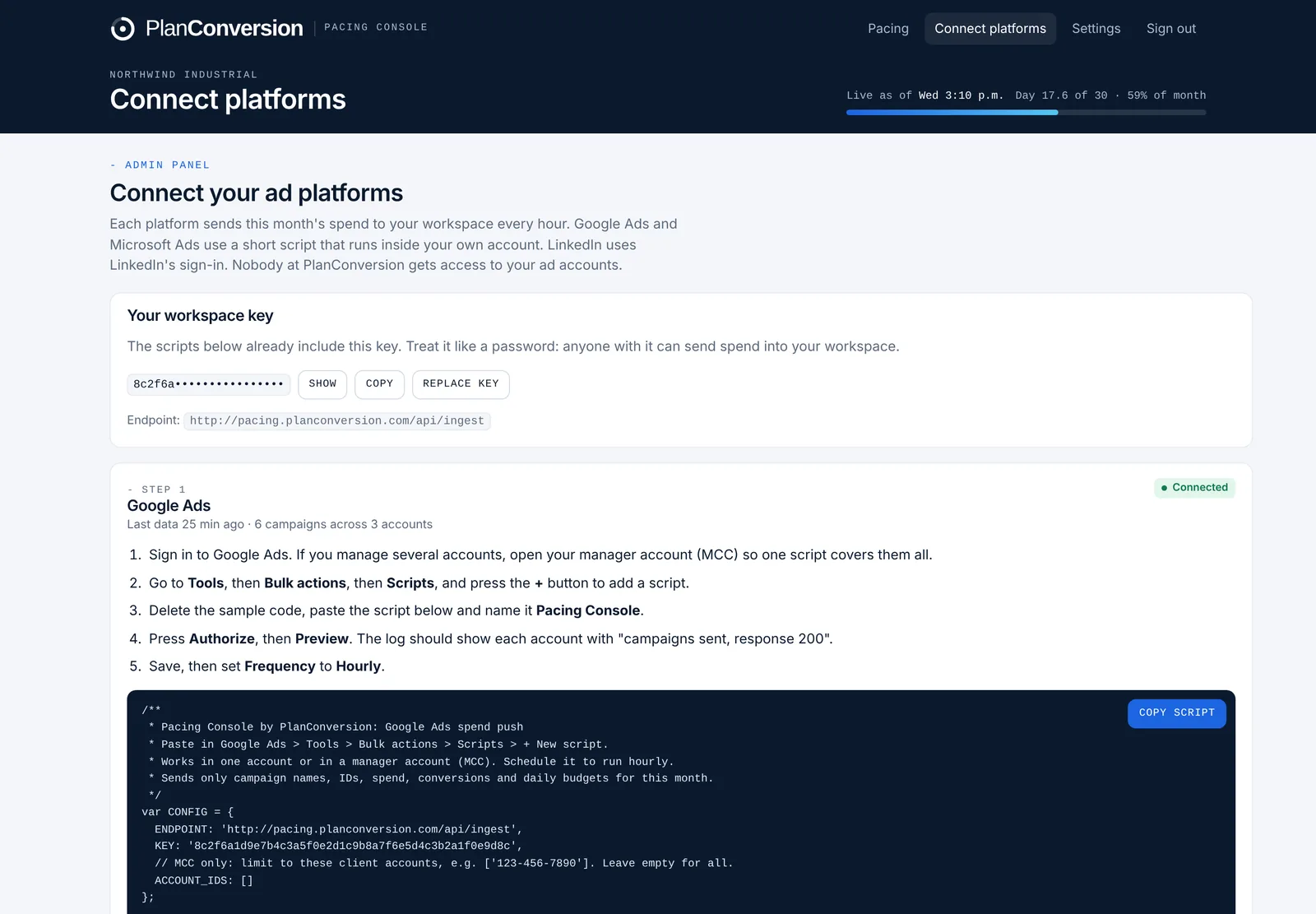
Sign up with your business details. You get a private workspace and a key that only your scripts use.
Paste the scripts
Copy the pre-filled script into Google Ads and Microsoft Ads (one script covers a whole manager account) and schedule it hourly. Connect LinkedIn with LinkedIn sign-in.
Add monthly budgets
Campaigns appear as soon as data arrives. Give each one its monthly budget and schedule, and pacing starts right away.
Share and get alerts
Invite your team, send a read-only report link to clients or finance, and turn on the daily email.
Built for teams that answer for every dollar
Enterprise marketing teams
Run several business units, regions and platforms against one budget. See every campaign’s pace in one place and give finance a link instead of a weekly spreadsheet.
Public companies and regulated budgets
Quarter-end accruals, budget controls and audit trails need spend that matches plan. Hourly, cut-to-date numbers catch drift days before month end.
Private and PE-backed companies
When every dollar is tied to pipeline targets, underspending is as costly as overspending. The forecast shows both early enough to act.
Agencies and consultants
Pace every client from one manager-account script, group campaigns by client, and send each client a live report link.
How it compares with the usual options
| Spreadsheet | Paid data connector | Pacing Console | |
|---|---|---|---|
| Cost | Free, but hours of manual work | Monthly subscription | Free |
| Refresh | When someone updates it | Daily or hourly | Hourly |
| Pace judged at the pull hour | Rarely | Rarely | Yes |
| Weekday schedules | Manual formulas | Varies | Built in |
| Month-end and conversion forecast | Manual formulas | Build it yourself | Built in |
| Daily alert email | No | Varies | Yes |
| Shareable client report | Share the sheet | Build a dashboard | One link |
Questions about Pacing Console
Read why it matters: why cut-to-date, real-time budget pacing matters for enterprise ad spend.
What is ad budget pacing?
Budget pacing compares what a campaign has spent so far with what it should have spent by now, so it lands on its monthly budget. Pacing Console measures it by the hour, in your time zone, for Google Ads, LinkedIn Ads and Microsoft Ads.
What does cut-to-date pacing mean?
Cut-to-date means expected spend is calculated up to the exact hour the spend was pulled, not to the end of the day. It avoids false underpacing alerts in the morning and false overpacing alerts at night.
Is Pacing Console really free?
Yes. The pacing board, month-end forecasts, conversions, the top recommendations, alerts, team invites and report links are free. Pro adds the Insights charts, every recommendation with its dollar impact and CRM lifecycle stages by campaign (HubSpot, Salesforce, Pipedrive or any CRM by CSV or API), and you can request it inside the app. It runs on Google Ads Scripts and Microsoft Ads Scripts, which are free features of those platforms, and LinkedIn’s own sign-in.
Does PlanConversion get access to my ad accounts?
No. The scripts run inside your accounts and send only campaign names, IDs, spend, conversions and daily budgets for the current month. LinkedIn uses read-only reporting access that you can revoke anytime.
How does the month-end forecast work?
It divides spend to date by the active days elapsed (to the hour) and multiplies by the active days in the month. The same run rate gives forecast conversions and a forecast cost per conversion.
Can I use it for several clients or business units?
Yes. One script in a Google Ads or Microsoft Ads manager account covers every client account. Group campaigns by client or business unit, and send each group a read-only report link.
Which currencies and time zones are supported?
CAD, USD, EUR, GBP and AUD, in any time zone. The time zone decides which month spend belongs to and how far through the day each pull is.
See your pace in the next hour
Create a free workspace, paste one script and watch every campaign’s pace and forecast update on its own.