Pipeline plan
Budget pacing measured to the hour, not to the end of the day
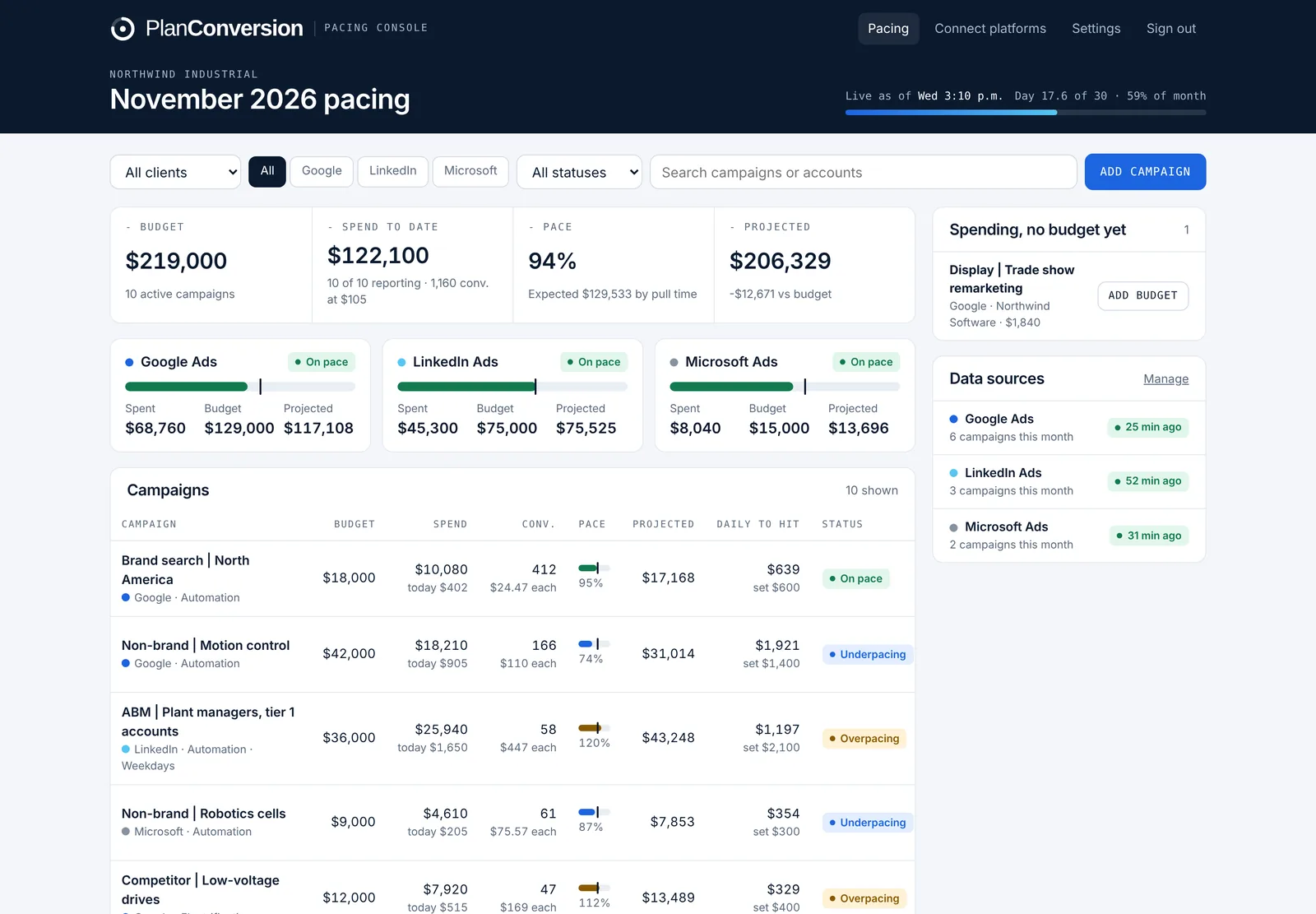
Pacing Console pulls Google Ads, Microsoft Ads and LinkedIn Ads spend every hour and compares it with what each campaign should have spent by that exact hour, in your time zone. A campaign is never flagged as behind at 9 am just because the day is not over. Weekday-only campaigns are paced on business days, the on-pace band follows your tolerance (10% by default) and the board warns you when a platform stops sending data. Pacing is free forever.
Plan: Free forever.
Last updated
What it does
- Expected spend calculated to the minute the data was pulled, in your time zone
- Pace for every campaign, platform and the whole account: on pace, overpacing or underpacing
- Weekday schedules: Monday to Friday campaigns are paced on business days only
- A tolerance you set (10% by default) decides what counts as on pace
- Stale-data warnings when a platform stops sending spend, so pace is never judged on old numbers
- Budgets in CAD, USD, EUR, GBP or AUD, in any time zone
How it works
Connect the platforms
Paste one pre-filled script in Google Ads and Microsoft Ads and connect LinkedIn with LinkedIn sign-in.
Add monthly budgets
Campaigns appear as soon as data arrives. Give each one a monthly budget and, if it runs weekdays only, a weekday schedule.
Read the board
Every hour the board shows spend, expected spend, pace and the gap to budget in dollars for each campaign.
Who it is for
In-house paid media teams
One view of every campaign’s pace across Google, Microsoft and LinkedIn, without a spreadsheet refreshed by hand.
B2B LinkedIn programs
Weekday schedules pace Monday to Friday campaigns the way they actually spend.
Agencies
Pace every client account from one manager-account script, grouped by client.
What is cut-to-date pacing?
Expected spend is calculated up to the exact hour the spend was pulled, not to the end of the day. It avoids false underpacing alerts in the morning and false overpacing alerts at night.
How often does spend update?
Every hour, from the scripts in Google Ads and Microsoft Ads and from the LinkedIn connection.
Is pacing really free?
Yes, forever. Pro adds Insights charts, every recommendation with its dollar impact, one-click budget changes and CRM lifecycle stages.
More features
Month-end spend and conversion forecast
Projected month-end spend and conversions per campaign, platform and account, with a forecast range on Pro.
Budget recommendations and one-click changes
The daily budget that lands each campaign, recommendations with dollar impact, and changes applied from the console.
Flight dates and budget plans
Flight dates, month-by-month budget plans, weekday schedules and cost per conversion targets per campaign.
CRM pipeline by campaign
HubSpot, Salesforce, Pipedrive or any CRM: contacts, MQLs, SQLs, opportunities and customers by campaign, with cost per stage.
Daily pacing email
One morning email with only the campaigns that need a change, and the daily budget that fixes each one.
Client and finance report links
A read-only live report for clients, CFOs and procurement, plus team roles and one-time invite links.
Google, Microsoft and LinkedIn setup
One pre-filled script per platform, LinkedIn sign-in, manager-account coverage and no ad-account access for PlanConversion.
Enterprise and security
Per-user Enterprise from 25 users: a workspace per brand or region, budgets changed only when queued, Canadian hosting, setup and quarterly reviews.
Try Pacing Console free
Free forever, and every new workspace starts with a 30-day Pro trial. No credit card.