Pacing Console Enterprise: ad spend control for B2B
Forecast paid media to quarter end and tie every campaign to pipeline and revenue
One board for Google Ads, Microsoft Ads and LinkedIn Ads spend, with forecasts, pipeline and revenue from your CRM, and approvals and guardrails on every budget. Set up with your team by PlanConversion.
From $1,500 USD a month, billed annually. 10 users included.
- Data hosted in Canada
- Scripts run inside your ad accounts
- Setup and quarterly reviews included
PlanConversion runs paid media and demand generation for


Founder’s in-house marketing leadership at


Agency clients and former employers of the team that builds Pacing Console. They are not presented as customers of the software.
Built for the people who answer for the spend
Control
Approvals and guardrails on every budget
Google Ads, Microsoft Ads and LinkedIn Ads budgets read from the platforms (plus Demandbase and 6sense with the ABM add-on), changes above your threshold held for an owner, and guardrails checked every day.
Clarity
Month end and quarter end, before they close
Spend, conversions, pipeline and revenue forecast with a likely P10 to P90 range, budget groups, purchase orders and a month-end accrual for finance.
Proof
Pipeline and revenue for every campaign
Opportunities, pipeline, won revenue, ROAS and CAC by campaign, from HubSpot, Salesforce or Pipedrive.
In short
PlanConversion Enterprise is Pacing Console Enterprise, ad spend control for B2B: $1,500 USD a month, billed annually, with 10 users included, then $20 USD per extra user a month. It keeps paid media spend on plan, with budgets read from your ad platforms, approvals, guardrails and finance exports, and reports pipeline and revenue for every campaign from your CRM. Link Console is an add-on for $199 USD a month for all users: it keeps campaign data clean, with governed UTM links, short links and an audit of every live campaign name. One account for both products: the same login, team and billing, and PlanConversion sets them up with your team. Teams that only need link governance can buy Link Console Enterprise on its own for $249 USD a month with unlimited users.
See where the month and quarter land, then test the plan before you move a dollar
Forecasts run from each campaign’s run rate and flight dates, with a likely range from how much daily spend has varied this month.
- Spend, conversions, pipeline and revenue forecast to month end or quarter end, with a P10 to P90 range
- The date each campaign runs out of budget at today’s pace, and how much will go unspent
- What-if scenarios by channel, and the budget needed to hit a pipeline or revenue target
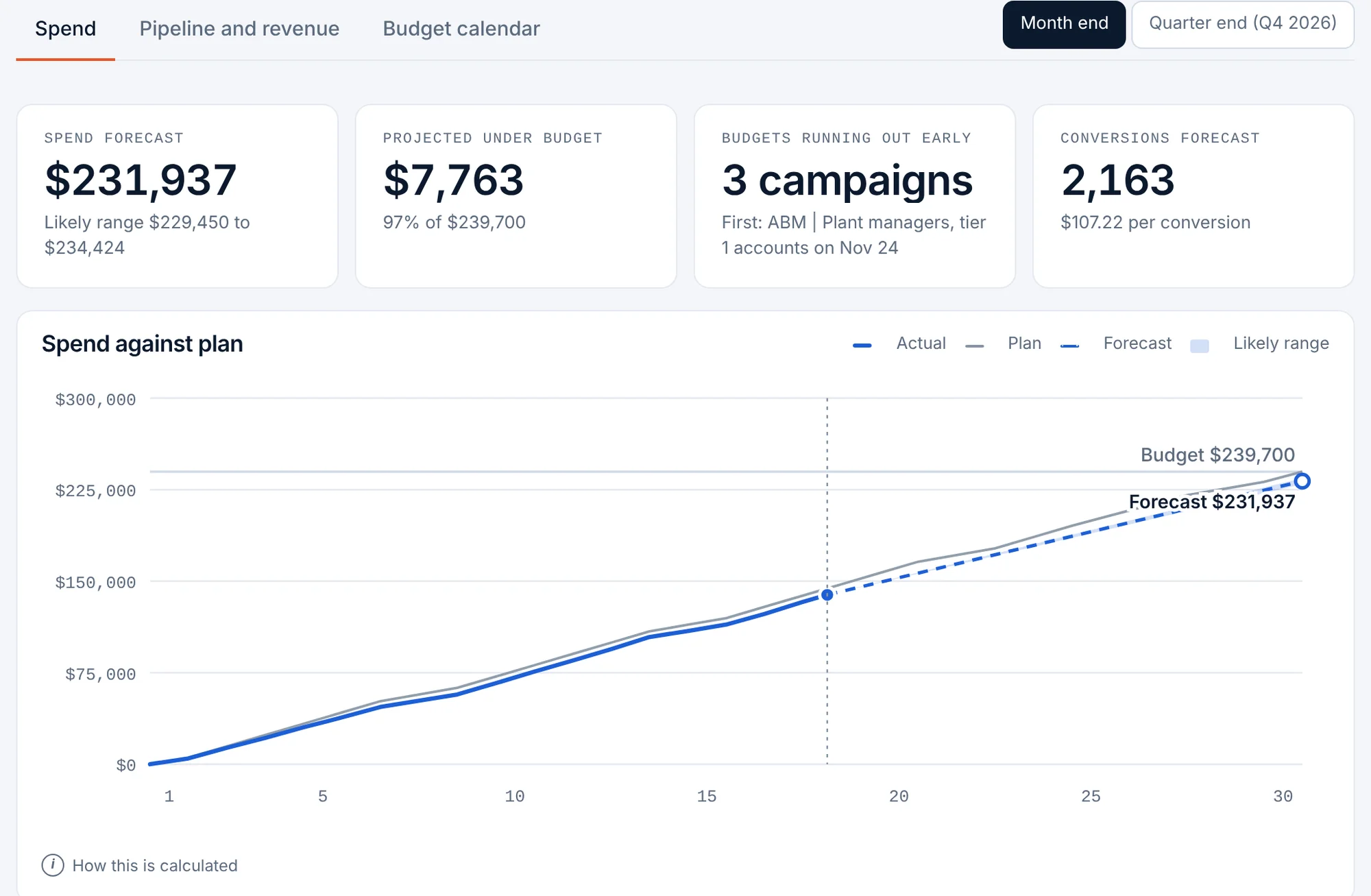 Month end or quarter endLikely range, P10 to P90
Pipeline, revenue, ROAS and CAC for every campaign, from your CRM
Deals come from HubSpot, Salesforce or Pipedrive, or by CSV or API for other CRMs, and each one is credited to the campaign that first brought in the contact.
- Opportunities, pipeline value, average deal size, won revenue, customers and win rate by campaign
- Pipeline-to-spend, ROAS and CAC side by side, so budget moves toward what creates revenue
- Any period from this month to the last 12 months, compared with the prior period and last year
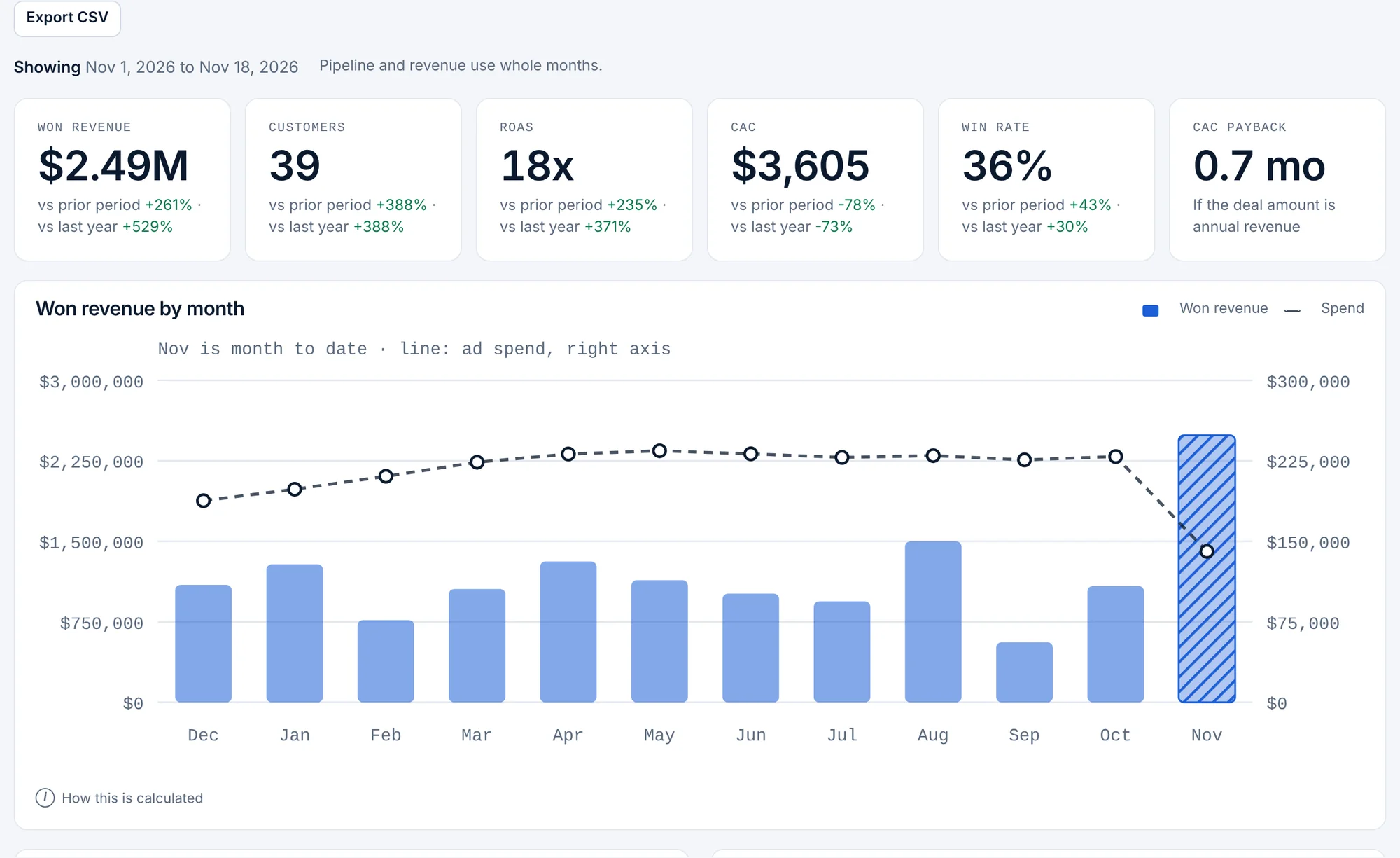 Last 12 months
Approvals, budget groups and guardrails that finance can sign off on
Budgets are read from Google Ads, LinkedIn Ads and Microsoft Ads, so nobody retypes them, and every change is logged with who made it and when.
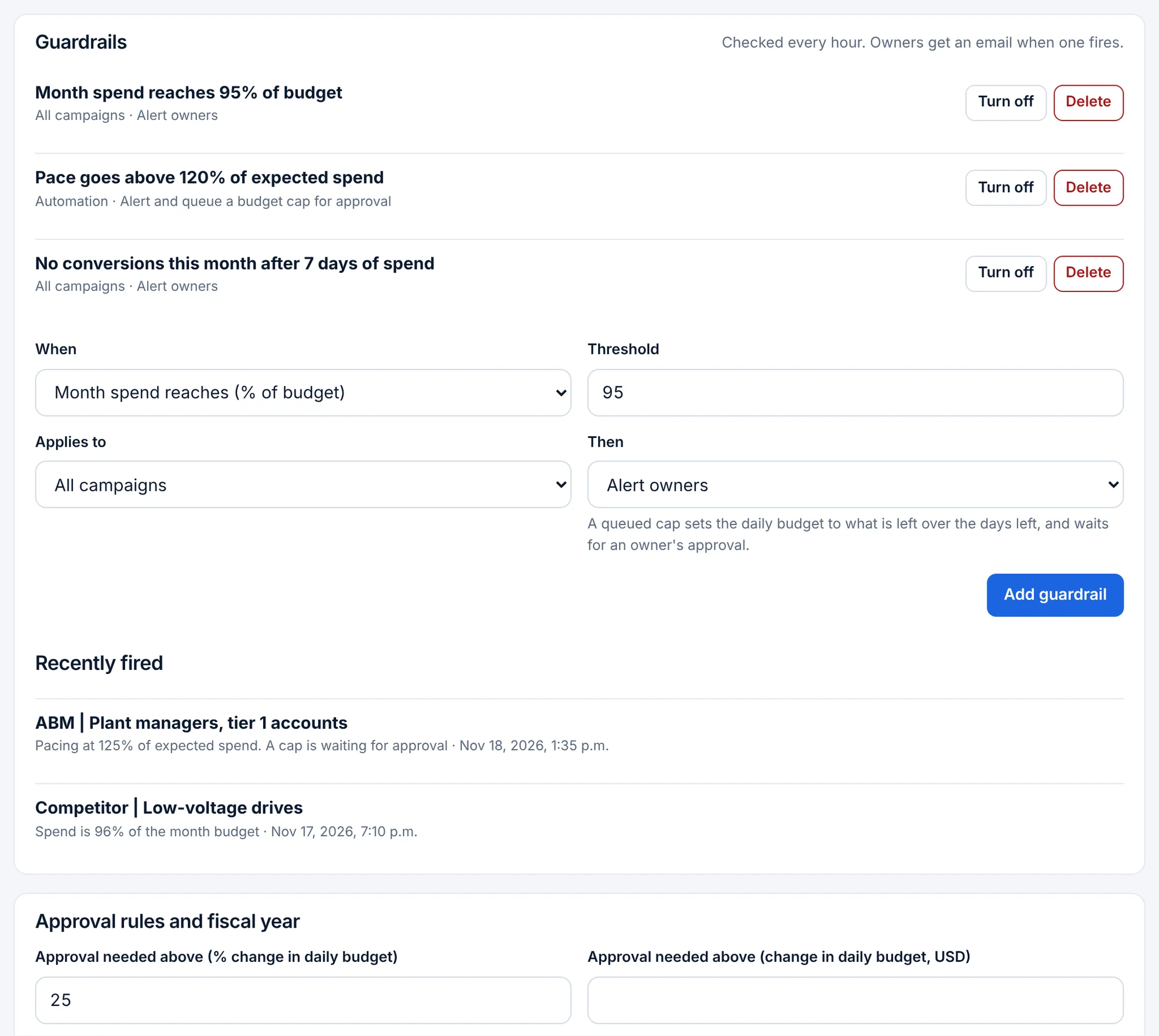
- Budget changes above your threshold wait for an owner before they reach Google Ads or Microsoft Ads
- Groups by business unit, region or platform, with quarter and fiscal-year plans and purchase orders that burn down as spend comes in
- Guardrails checked every day with email, Slack or Microsoft Teams alerts, plus an audit log and a month-end accrual file
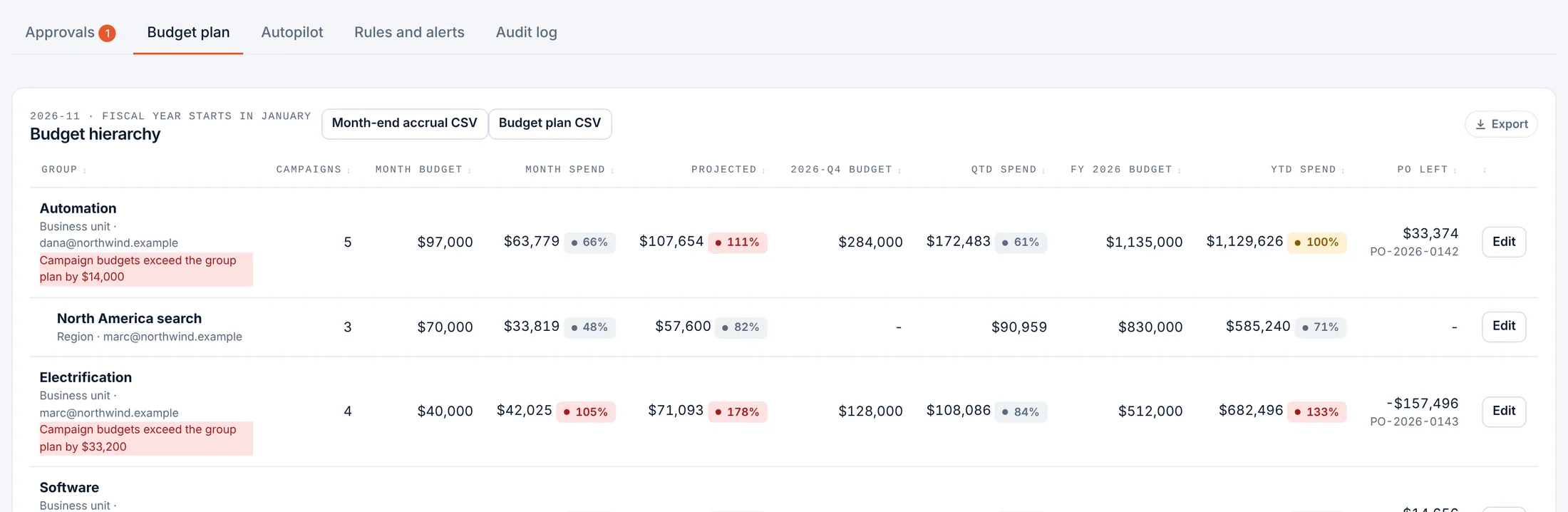 Owner approvalPurchase order balance
One naming convention and the right access for every team
Add Link Console for $199 USD a month for all users: governed UTM links and an audit of every live campaign name, in the same workspaces and under the same login.
- Naming rules and approved values, with owner approval for every new source, medium or campaign value
- Hourly read-only audit of live Google Ads and Microsoft Ads URLs, plus a campaign and ad group name audit with a fix list
- A workspace per brand, region or client under one login, with owner, editor and viewer roles
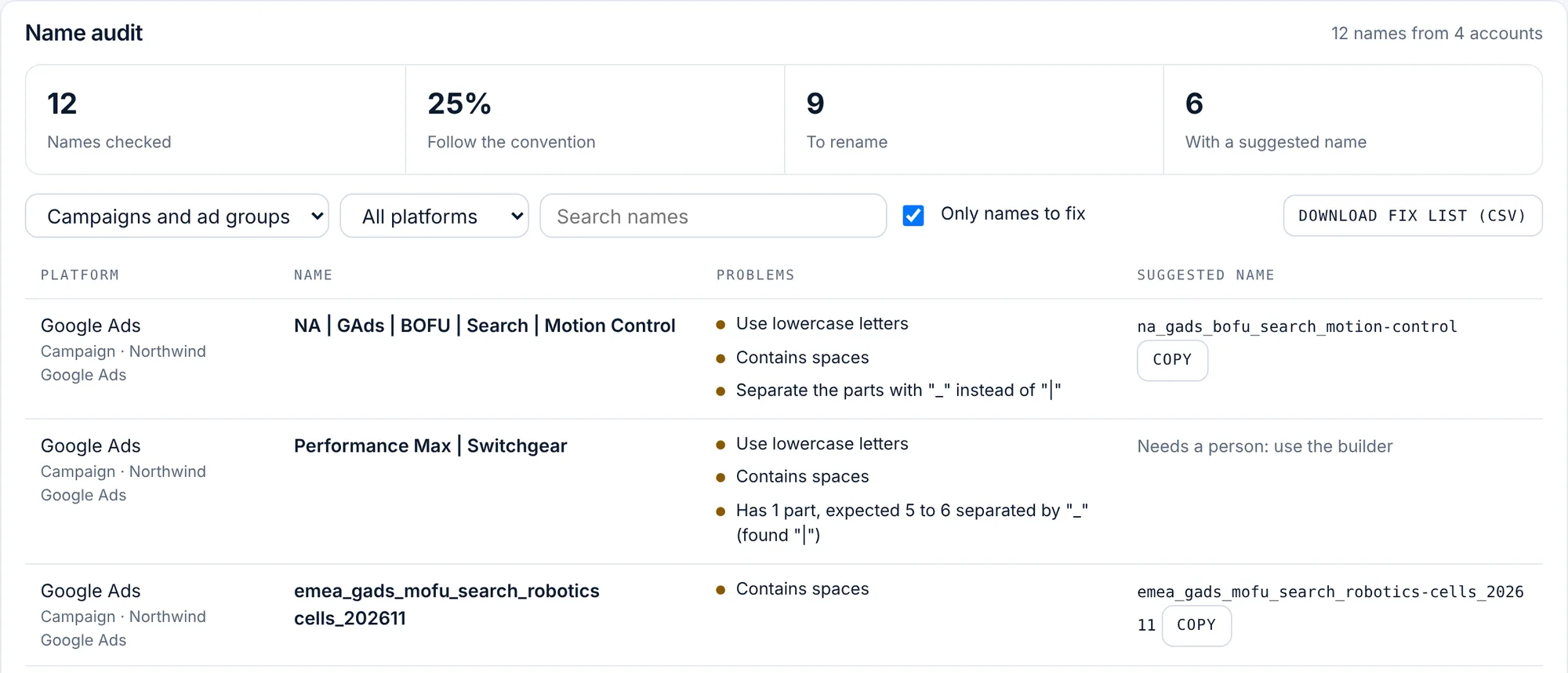 Suggested compliant name
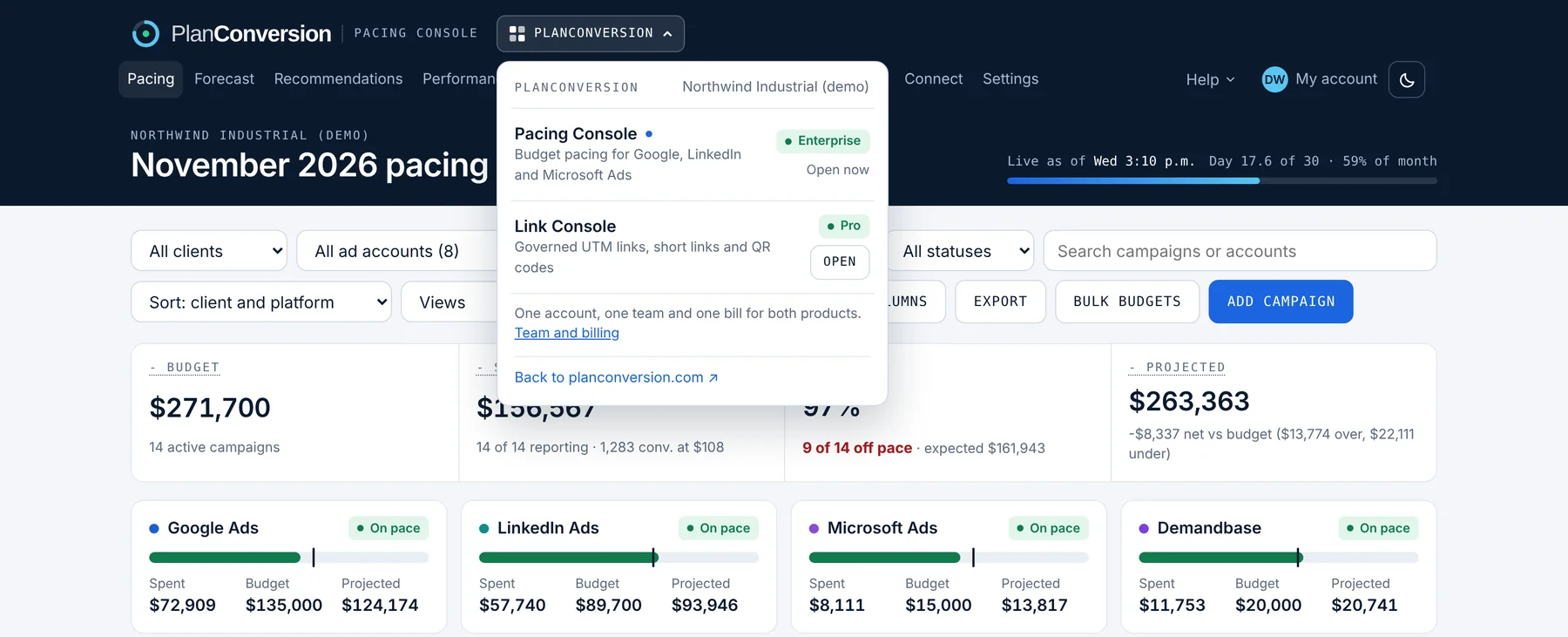
Demandbase and 6sense on the same board
Demandbase and 6sense advertising spend paced next to Google Ads, LinkedIn Ads and Microsoft Ads, from daily exports. $750 USD per workspace a month, billed annually, with setup by PlanConversion.
From scope call to a working board
Scope and security review
We map your brands, regions, ad accounts, agencies and finance reporting, complete your security questionnaire and sign a data processing agreement before any data moves.
Setup done for you
PlanConversion installs the scripts, connects LinkedIn and your CRM, and loads budgets, flight dates, plans and purchase orders.
Ad platforms connect in about 15 minutes
Training and quarterly reviews
We train the people who approve budgets and build links, then a senior strategist reviews pacing, forecast accuracy and budget allocation with you every quarter.
A pacing spreadsheet next to Pacing Console Enterprise
| Typical spreadsheet | Pacing Console Enterprise | |
|---|---|---|
| Budgets | Copied in by hand from each platform | Read from Google Ads, Microsoft Ads and LinkedIn Ads |
| Forecast | A straight-line formula to month end | Month and quarter end, with a P10 to P90 range |
| Pipeline and revenue | A separate CRM export to match up | By campaign from HubSpot, Salesforce or Pipedrive |
| Approvals | Email threads | Changes above your threshold wait for an owner, and are logged |
| Alerts | Someone remembers to check | Daily guardrail checks, by email, Slack or Microsoft Teams |
| Finance | Rebuilt at every month end | Month-end accrual file, budget plan file and PO balances |
| Access | A shared file link | Owner, editor and viewer roles in isolated workspaces |
Compare Pacing Console with TrueClicks, Optmyzr, Adalysis and Opteo
Ready for your security review
PlanConversion completes your security questionnaire and signs a data processing agreement before any data moves.
- Scripts run inside your ad accounts and send only campaign names, IDs, spend, budgets and live ad URLs. A budget changes only when someone on your team queues the change, and approval rules can hold it for an owner.
- LinkedIn connects with read-only reporting access that you can revoke
- Database hosted in Canada (AWS ca-central-1, Montreal), with each workspace isolated by row-level security
- CRM credentials encrypted with AES-GCM; card details handled by Stripe
- Sign-in with Google or Microsoft work accounts, or a work email and password; invite links expire after 14 days
Who it is for
Marketing operations
One convention for links and campaign names, and one view of spend against plan across every platform and business unit.
Finance and procurement
Spend against plan and purchase orders, checked every day, approvals above a threshold, an audit log and a month-end accrual file.
Agencies and multi-brand teams
A workspace per client or brand under one login, with roles that keep each team to its own accounts.
A base platform fee, then seats and add-ons
Pacing Console Enterprise
$1,500USD a month, billed annually
10 users included, then $20 USD per extra user a month
- Pipeline and revenue by campaign from your CRM
- Forecasts, scenarios and target back-solve
- Approvals, budget groups, purchase orders, guardrails and audit log
- Finance exports: month-end accrual and budget plan files
- Setup by PlanConversion and a quarterly review with a senior strategist
- Priority support within one business day
Add-ons and options
- Link Console add-on$199 USD a month, all users
- UTM and naming governance, approvals and ad URL audits for every user of the workspace
- ABM add-on$750 USD per workspace a month
- Demandbase and 6sense spend paced next to Google, LinkedIn and Microsoft
- Extra users$20 USD per user a month
- Each user beyond the 10 included
- Link Console Enterprise on its own$249 USD a month, unlimited users
- For teams that only need link governance: naming taxonomy setup, invoice billing and priority support, without Pacing Console
Enterprise is billed annually, with invoices in CAD or USD; the minimum is about $18,000 USD a year for up to 10 users. There is no minimum seat count. Every workspace can start with its free first month.
Common questions
Bring your procurement and security questions to a demo, or explore the live demo first.
How much does Enterprise cost?
Pacing Console Enterprise is $1,500 USD a month, billed annually, with 10 users included, then $20 USD per extra user a month. Link Console is an add-on for $199 USD a month for all users of the workspace, and the ABM add-on is $750 USD per workspace a month. Link Console Enterprise on its own, without Pacing Console, is $249 USD a month with unlimited users.
Can we pay by invoice, in CAD or USD?
Yes. Enterprise is billed annually, with invoices in CAD or USD. The minimum is about $18,000 USD a year for up to 10 users, and there is no minimum seat count.
What do security and procurement reviews need from us?
Send us your security questionnaire: PlanConversion completes it and signs a data processing agreement before any data moves. Data is hosted in Canada, each workspace is isolated by row-level security, and the ad platform scripts run inside your own accounts.
What is included in setup?
PlanConversion installs the scripts in Google Ads and Microsoft Ads (one script covers a whole Google Ads manager account), connects LinkedIn and your CRM, and loads budgets, flight dates, plans and purchase orders. We then train the people who approve budgets and build links.
How long does onboarding take?
Connecting the ad platforms takes about 15 minutes: a pre-filled script for Google Ads and Microsoft Ads and a LinkedIn sign-in. PlanConversion does it with your team, then connects your CRM and loads budgets, plans and purchase orders. The full rollout depends on how many brands, regions and accounts you bring.
What does pipeline and revenue reporting show?
For every campaign: opportunities, pipeline value, average deal size, won revenue, customers, win rate, pipeline-to-spend, ROAS and CAC, from HubSpot, Salesforce or Pipedrive, or by CSV or API for other CRMs. Each deal is credited to the campaign that first brought in the contact, for any period from this month to the last 12 months.
How are deals credited to campaigns?
By first touch: each deal is credited to the campaign that first brought in the contact, using the contact’s original source and utm_campaign in your CRM. Pipeline counts opportunities created in the period at their current amount, and revenue counts deals won in the period.
Can Pacing Console change our budgets without approval?
No. A budget changes only when someone queues the change, and your own script applies it on its next run. With an approval rule, changes above your percentage or amount wait for an owner first. Every change is logged.
What can the scripts read and change?
The Google Ads and Microsoft Ads scripts run inside your accounts and send only campaign names, IDs, spend, budgets and live ad URLs. They change a budget only when someone on your team queues the change, and approval rules can hold it for an owner. LinkedIn connects with read-only reporting access that you can revoke.
Which guardrails and alerts are included?
Guardrails are checked every day, for example an alert at 95% of the month budget or a budget cap queued for approval, with alerts by email, Slack or Microsoft Teams. Data updates daily when you connect by sign-in, or hourly with the Google Ads or Microsoft Ads script, and you can press Sync now any time. Every budget edit goes to an audit log with who made it and when.
Can we try it first?
Yes. The live demo runs the real app on sample data, and every workspace can start with its free first month.
Can we start on Pro and move to Enterprise?
Yes. Pacing Console Pro is $49 USD per workspace a month. Enterprise is turned on for the same workspace, so your users, connections and history stay, and everything in Pro stays included.
Can we add Link Console later?
Yes. Link Console runs in the same workspaces, so adding it later keeps your users, roles and data. The add-on is $199 USD a month, with no per-user fee.
Can we run several brands, regions or clients?
Yes. Each brand, region or client gets its own isolated workspace under one login, with owner, editor and viewer roles that keep each team to its own accounts.
What is the ABM add-on?
It adds Demandbase and 6sense advertising spend to the Pacing Console board next to Google, LinkedIn and Microsoft. It is $750 USD per workspace per month, billed annually, and PlanConversion sets up the daily export with you.
Where is our data hosted?
In Canada, on AWS ca-central-1 in Montreal, with each workspace isolated by row-level security.
Do you support single sign-on?
Sign-in is with Google or Microsoft work accounts, or a work email and password. SAML single sign-on is not offered.
What does the quarterly review cover?
A senior PlanConversion strategist reviews pacing, forecast accuracy and budget allocation across platforms and campaigns with your team.
Plan your Enterprise rollout
Tell us your brands, platforms and team size, and we come back within one business day with a scope and price.