Set every campaign’s budget at once, or let Google Ads labels set them
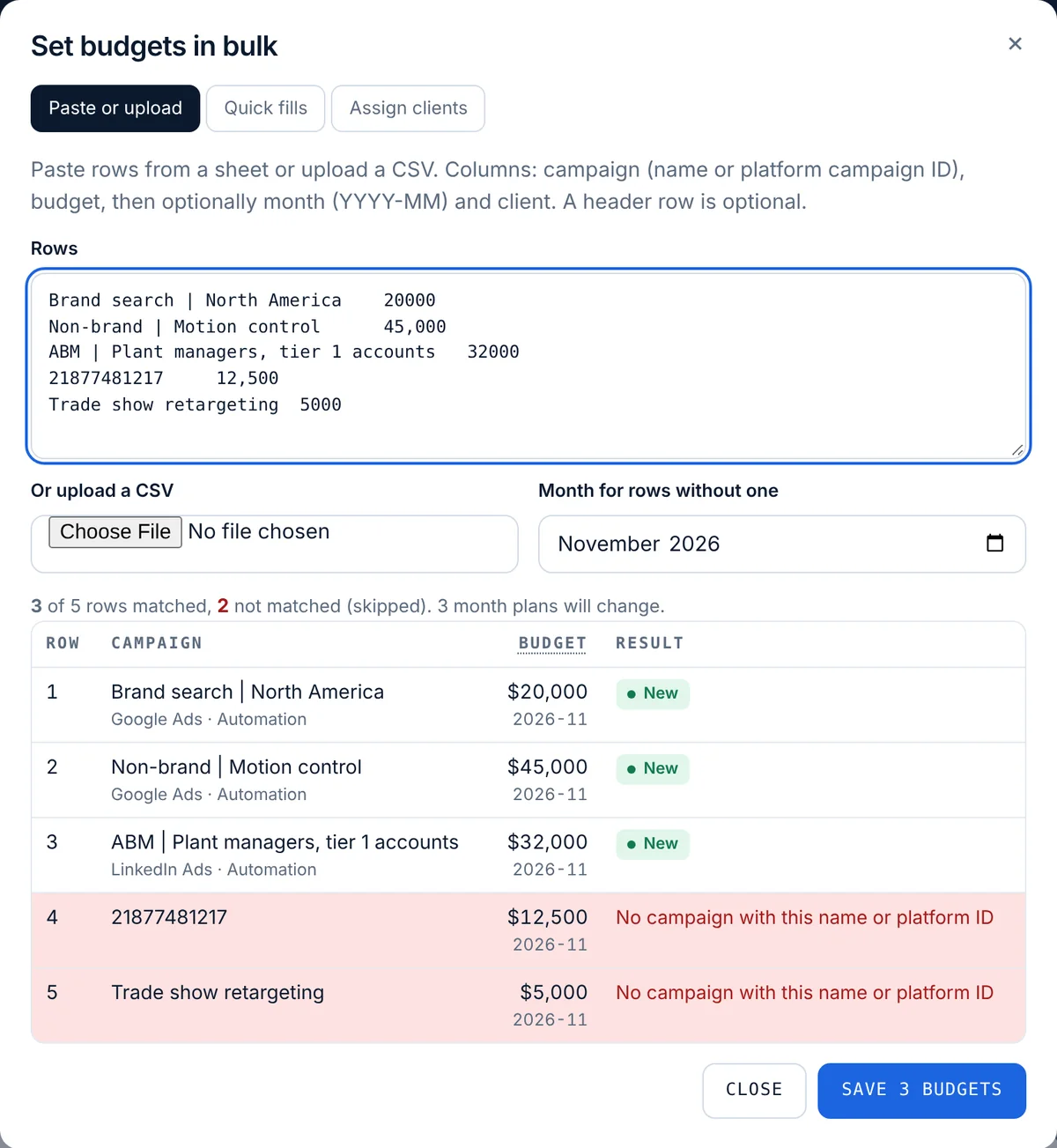
Pacing Console’s Bulk budgets dialog sets many monthly budgets at once: paste rows from a sheet or upload a CSV with the campaign name or platform campaign ID, the budget and optionally the month and client, check each match in a preview, and save them as month plans. Quick fills copy last month’s plans or freeze today’s platform daily budgets as this month’s plan. With Google Ads connected by sign-in, a budget label such as “Budget 5000” on a campaign or an ad account, or a campaign total budget, fills the monthly budget on every hourly sync.
A budget a person typed is never overwritten. Bulk budgets are on every plan.
Plan: Bulk budgets: every plan, including the free first month, for owners and editors. Budget labels and total budgets: Google Ads connected by sign-in.
Pacing Console at a glance
- What it is
- Ad spend control for B2B from PlanConversion: keeps every ad dollar on plan and shows what it turned into, with hourly budget pacing for every campaign, month-end forecasts, the daily budget that lands the month, and spend tied to leads, pipeline and revenue in the CRM
- Built by
- B2B paid media practitioners: PlanConversion runs paid media budgets for enterprise B2B clients
- Pillars
- Control: hourly pace and email alerts on every plan, Autopilot and Slack or Microsoft Teams alerts on Pro, approvals and guardrails on Enterprise. Clarity: month-end forecast with ranges, month-end accrual for finance, white-label reports and scheduled emails, on Pro. Proof: cost per lead and opportunity by campaign from the CRM on Pro (by ad group and keyword with Google Ads connected by sign-in and HubSpot), pipeline and revenue on Enterprise
- Platforms
- Google Ads, Microsoft Ads and LinkedIn Ads
- CRM
- HubSpot, Salesforce, Pipedrive, or any CRM by CSV or API: lifecycle stage counts by campaign (Pro)
- Autopilot
- Pro and Enterprise: automatic pacing that sets the daily budget of Google Ads and Microsoft Ads campaigns within your floor, cap and maximum change per run, in suggest-only or apply mode; it never pauses a campaign
- Google Ads breakdowns
- With Google Ads connected by sign-in: spend by ad group, keyword, search term, location and device, with impression share lost to budget or rank, plus HubSpot leads and opportunities by ad group and keyword (Pro) and pipeline and won revenue (Enterprise)
- Budgets and reports
- Bulk budgets and Google Ads budget labels on every plan; white-label report links, scheduled report emails, a month-end accrual for finance and Slack or Microsoft Teams alerts on Pro and Enterprise; CSV and Google Sheets export on every table
- Documentation
- https://pacing.planconversion.com/docs
- Pipeline and revenue
- Enterprise: opportunities, pipeline value, average deal size, won revenue, customers, win rate, pipeline-to-spend, ROAS and CAC for every campaign, credited to the campaign that first brought in the contact
- 1 month free
- First month free at any spend, for up to 3 users. Then Pro, or the workspace pauses with its data kept
- Pro
- $49 USD per workspace a month, or $490 USD a year (12 months for the price of 10); 10 users included, then $5 USD per extra user
- Enterprise
- $1,500 USD a month, billed annually, 10 users included, then $20 USD per extra user a month
- With Link Console
- Pro: add Link Console for $39 USD a month, so both products are $88 USD per workspace a month ($880 USD a year); Enterprise adds Link Console for $199 USD a month for all users. One account for both products: the same login, team and billing
- Start and sign-in
- First month free, no credit card; Google or Microsoft sign-in
What it does
- Paste rows or upload a CSV up to 2 MB: campaign name or platform campaign ID, budget, then optionally month (YYYY-MM) and client
- A preview of every row before saving: new, same, the old amount it replaces, or why it was skipped
- Quick fills: copy last month’s budgets to this month, or save each active campaign’s platform daily budget times its active days as this month’s plan
- Client rules that assign campaigns to clients by campaign name or account name
- Google Ads budget labels on a campaign (its monthly budget) or an ad account (split across its campaigns without a budget, in proportion to their daily budgets)
- Google Ads total budgets for a custom period, prorated to this month’s share of the campaign’s days
- A budget source line on every campaign: typed, month plan, a Google Ads label, an account label, a total budget or the platform daily budget
How it works
Open Bulk budgets
On the Pacing toolbar, press Bulk budgets and choose Paste or upload, Quick fills or Assign clients.
Check the preview
Each row shows the campaign it matched and the result before you press Save.
Or label in Google Ads
With Google Ads connected by sign-in, add a label such as “Budget 5000” or “Monthly budget 5k” to a campaign or an account, and Pacing Console reads it on the next hourly sync.
Who it is for
Agencies
Load every client’s monthly budgets from the media plan in one paste, with the client column filled in.
Teams that plan in Google Ads
Keep the budget where the campaign lives: a label or a total budget in Google Ads sets the monthly plan.
Finance-led planning
Upload the approved plan as a CSV each month instead of retyping it campaign by campaign.
Which label names are read as a budget?
Names such as “Budget 5000”, “Budget: 5,000”, “Monthly budget 5000”, “Budget 5k” or “Budget 5000 USD”, in any letter case. “Weekly budget 500”, “Q4 Budget 5000” or “Budget 5000 per month” are not read. The amount uses the workspace currency.
Which budget wins when there are several?
A month plan someone typed, then a monthly budget typed on the campaign, then a campaign budget label, then a campaign total budget, then an account budget label, then the platform daily budget times the active days.
Will a label overwrite a budget I typed?
No. A plan a person typed is never overwritten, and if you edit an automatic plan, it becomes yours. When a label is removed or a total budget ends, the automatic plan is removed on the next sync.
Is it in the free first month?
Yes. Bulk budgets are on every plan. Budget labels and total budgets need Google Ads connected by sign-in.
More features
Hourly cut-to-date pacing
Spend compared with what should be spent by the hour the data was pulled, in your time zone, with weekday schedules.
Month-end spend and conversion forecast
Projected month-end spend and conversions per campaign, platform and account, with a forecast range on Pro.
Budget recommendations and one-click changes
The daily budget that lands each campaign, recommendations with dollar impact, and changes applied from the console.
Flight dates and budget plans
Flight dates, month-by-month budget plans, weekday schedules and cost per conversion targets per campaign.
CRM pipeline by campaign
HubSpot, Salesforce, Pipedrive or any CRM: contacts, MQLs, SQLs, opportunities and customers by campaign, with cost per stage.
Pipeline and revenue reporting
Enterprise: opportunities, pipeline value, won revenue, win rate, pipeline-to-spend, ROAS and CAC for every campaign, from your CRM.
Daily pacing email
One morning email with only the campaigns that need a change, and the daily budget that fixes each one.
Client and finance report links
A read-only live report for clients, CFOs and procurement, plus team roles and one-time invite links.
Google, Microsoft and LinkedIn setup
One pre-filled script per platform, LinkedIn sign-in, manager-account coverage and no ad-account access for PlanConversion.
Saved views, CSV export and live Google Sheets
Sort and filter the pacing table, save views for yourself or the team, and export to CSV or a Google Sheet that updates itself.
Performance vs prior period and last year
Pro: spend, conversions and cost per conversion by channel and campaign, against the prior period and the same period last year.
Budget guardrails and approvals
Enterprise: approvals above your threshold, hourly guardrails, budget groups with purchase orders, an audit log and finance exports.
Autopilot: automatic budget pacing
Pacing Console sets the daily budget that lands each Google Ads and Microsoft Ads campaign on plan, within limits you set. Pro and Enterprise.
Google Ads breakdowns: where the budget goes
Spend by ad group, keyword, search term, location and device, impression share lost to budget or rank, and CRM leads by ad group and keyword.
White-label reports and scheduled emails
Your logo, name and color on every client report, weekly or monthly emails with the pacing table, and a month-end accrual for finance. Pro.
Enterprise and security
Enterprise from $1,500 USD a month with 10 users included: pipeline and revenue by campaign from your CRM, budgets read from your ad platforms, POs, approvals, guardrails, audit log, finance exports, Canadian hosting and setup.
How it compares
- Best PPC budget pacing tools in 2026
- Best Optmyzr alternatives in 2026
- Best Shape.io alternatives in 2026
- Best ad spend forecasting tools in 2026
- Best tools to connect ad spend to pipeline in 2026
- Best LinkedIn Ads budget management tools in 2026
- Best Improvado alternatives in 2026
- Best Funnel.io alternatives in 2026
- Pacing Console / Optmyzr
- Pacing Console / TrueClicks
- Pacing Console / Shape
- Pacing Console / Adalysis
- Pacing Console / Opteo
- Pacing Console / Swydo
- Pacing Console / Google Sheets
- Pacing Console / Google Ads scripts
- Pacing Console / Adzooma
- Pacing Console / Supermetrics
- Pacing Console / Looker Studio
- Pacing Console / Google Ads
- Pacing Console / Marin Software
- Pacing Console / Skai
- Pacing Console / Search Ads 360
- Pacing Console / Acquisio
- Pacing Console / Brightbid
- Pacing Console / Google Ads Performance Planner
- Pacing Console / HubSpot ads
- Pacing Console / Funnel.io
- Pacing Console / Improvado
- Pacing Console / Adverity
- Pacing Console / Whatagraph
- Pacing Console / AgencyAnalytics
- Pacing Console / DashThis
- Pacing Console / Databox
- Pacing Console / Two Minute Reports
- Pacing Console / Coupler.io
- Pacing Console / Windsor.ai
- Pacing Console / Dreamdata
- Pacing Console / HockeyStack
- Pacing Console / Factors.ai
- All comparisons
Try Pacing Console free for a month
Every new workspace gets its first month free, up to 3 users, no credit card. Then Pro at $49 USD per workspace a month.





