Pipeline plan
Campaign names that follow one convention, in every ad account
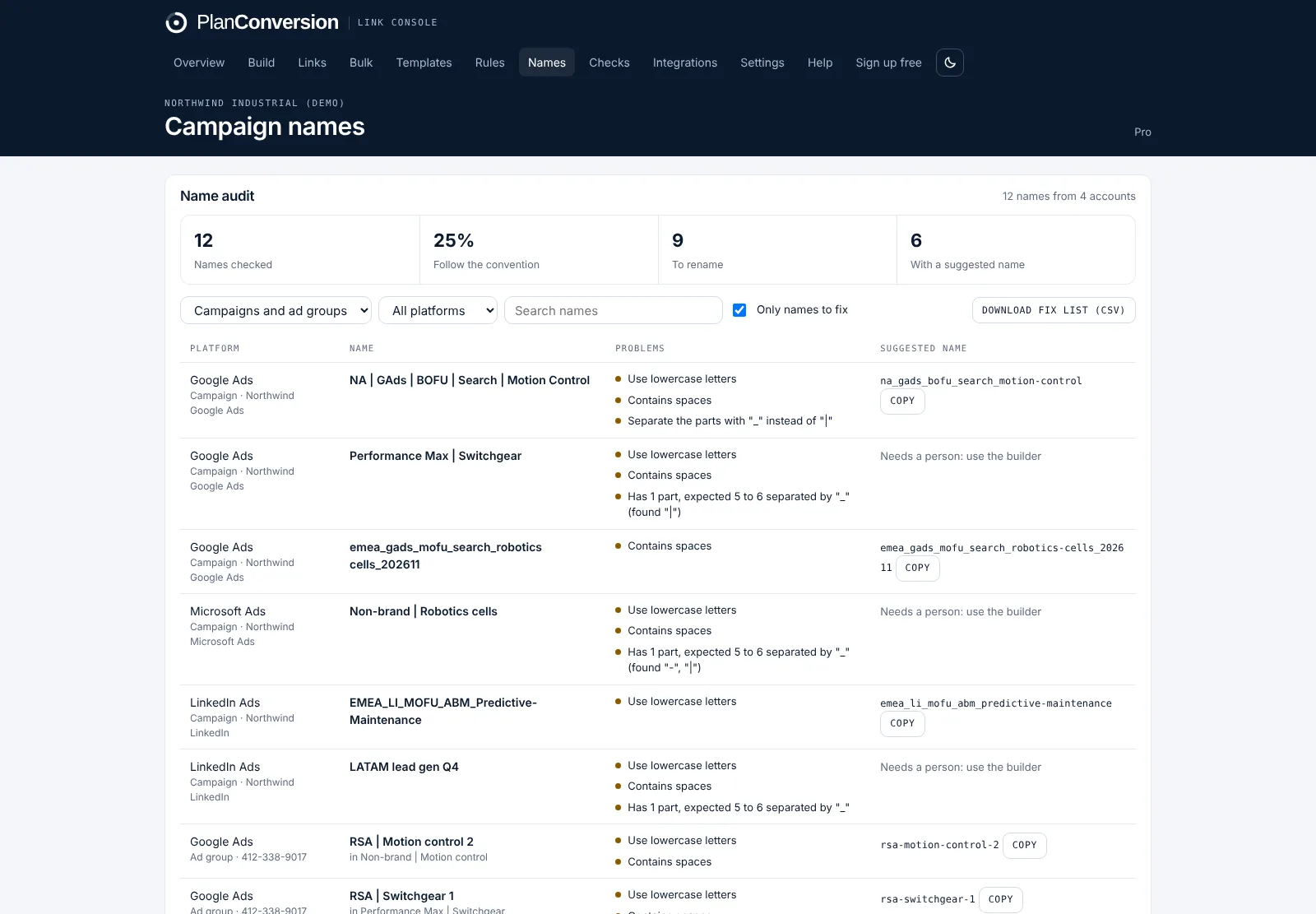
Link Console’s campaign name governance lets you define the parts every campaign and ad group name is built from (for example region, channel, funnel stage, type, product and start month), then checks live names in Google Ads, Microsoft Ads and LinkedIn Ads against it. Each name that breaks the convention is listed with the exact problem and, when the fix is mechanical, a corrected name to copy. A name builder makes compliant names before a campaign goes live.
The audit only reads names; it never renames anything.
Plan: Convention and name builder free on every plan, with the first 10 audit results. Pro adds the full audit, ad group names and the CSV fix list.
Last updated
Link Console at a glance
- What it is
- A UTM link builder from PlanConversion that applies naming rules as people type, with short links, QR codes and a shared link history
- Checks
- Live Google Ads and Microsoft Ads URLs (hourly, read only, Pro); GA4 exports; HubSpot, Salesforce and Pipedrive (Pro)
- Free plan
- Free forever for up to 3 users: naming rules, approved values, approvals, 5 templates, 100 short links a month
- Pro
- $49 USD per workspace a month, or $490 a year (2 months free); 10 users included, then $5 per extra user
- Enterprise
- $12 USD per user a month, billed annually, from 25 users
- With Pacing Console
- Pro $79 per workspace a month; Enterprise $28 per user a month
- Trial
- 30-day Pro trial on every new workspace, no credit card
- Sign-in and extension
- Google or Microsoft sign-in; Chrome extension coming soon to the Chrome Web Store
What it does
- A naming convention per level, campaign and ad group: separator, letter case and the parts in order
- Four kinds of parts: approved values (region, channel, funnel), free text, dates (202611) and numbers
- A name builder: pick the parts from menus and copy a name that follows the convention
- An audit of live campaign names in Google Ads, Microsoft Ads and LinkedIn Ads, and ad group names in Google Ads and Microsoft Ads
- The exact problem for each name: wrong case, spaces, the wrong separator, a missing part or a value that is not approved
- A suggested name when the fix is mechanical, and a CSV fix list with account, campaign, current name and suggested name (Pro)
- Compliance with the convention counts toward the attribution hygiene score on the overview
How it works
Define the convention
Start from the B2B default (region_channel_funnel_type_product_start) or build your own: separator, case and the parts in order, with approved values where the list is fixed.
Connect the ad accounts
Campaign names come from the same read-only script as the link audit for Google Ads and Microsoft Ads, and from the LinkedIn Ads connection. Campaigns with spend this month or last month are checked.
Review the name audit
See the share of names that follow the convention, filter by platform or level, and copy suggested names where the fix is mechanical.
Rename and prevent
Rename in the ad platform, or hand the CSV fix list to whoever manages the account. New campaigns use the name builder, so the problem stops at the source.
Who it is for
Marketing operations
Campaign names carry region, funnel stage and product into every report. One convention means reports group correctly without lookup tables.
Paid media managers
Find the campaigns named “Brand Campaign 2” or “NA | Search” before the quarterly review, with a corrected name ready to paste.
Agencies managing many accounts
Give each client its own convention and show them a compliance score that goes up as accounts are cleaned.
Does Link Console rename my campaigns?
No. The audit only reads names. You rename in Google Ads, Microsoft Ads or LinkedIn Ads, or use the CSV fix list to do it in bulk.
Which platforms are checked?
Campaign names in Google Ads, Microsoft Ads and LinkedIn Ads. Ad group names in Google Ads and Microsoft Ads, through the same read-only script used by the link audit.
When does it suggest a corrected name?
When the fix is mechanical: case, spaces, the wrong separator or a misspelled approved value. When a part is missing or unclear, the name is marked for a person to rename with the builder.
Is it the same as the UTM naming rules?
No. Naming rules govern the UTM values inside links. Campaign name governance covers the names of the campaigns and ad groups themselves. Many teams reuse the same values in both.
What is free and what is Pro?
The convention, the name builder and the first 10 audit results are free on every plan. Pro adds the full audit, ad group names and the CSV fix list.
More features
Naming rules and approved values
Live cleaning to your convention, approved values, locked and required parameters, paste-and-split and templates.
Team workflow and approvals
Value requests approved once for everyone, roles, invite links, shared history, an overview dashboard and an activity log.
Short links and QR codes
Short links with click counts, editable destinations, a QR code designer, custom endings and your own branded domain.
Bulk builder and spreadsheet import
Build hundreds of links from a CSV, add custom parameters and fix the UTM spreadsheet you already have.
Ad account link audit
An hourly, read-only check of every live Google Ads and Microsoft Ads final URL, tracking template and URL suffix.
Link health monitor
Daily checks of every saved destination for 404s, errors, long redirect chains and redirects that strip UTMs.
Attribution check for GA4 and CRM
See which source, medium and campaign values break the convention in GA4, HubSpot, Salesforce or Pipedrive, and what they hold.
API, webhooks and Chrome extension
A REST API with workspace keys, outgoing webhooks for Zapier and Make, and a Chrome extension on every plan.
Enterprise and security
Per-user Enterprise from 25 users: isolated workspaces, approvals, a full change log, Canadian hosting, invoice billing and setup by PlanConversion.
Try Link Console free
Free forever, and every new workspace starts with a 30-day Pro trial. No credit card.