How we scored 100 on PageSpeed Insights: a B2B website case study
On November 9, 2026, PageSpeed Insights scored the planconversion.com homepage 100 for Performance, Accessibility, Best Practices and SEO on desktop, plus 3/3 for Agentic Browsing. PlanConversion got there with a static Next.js build, strict image, font and JavaScript budgets, accessibility rules on every change, and AI agents that check each pull request before a person approves it. Lab scores vary between runs and mobile is harder, so we treat them as a check and aim for field Core Web Vitals.
Key takeaways
- Desktop PageSpeed Insights on the homepage: 100, 100, 100 and 100, plus 3/3 Agentic Browsing. Best mobile Lighthouse runs after fixes: 98 on the homepage, 99 on an article and a service page.
- The foundation is architectural: a static Next.js export ships complete HTML, so search and AI crawlers never wait for JavaScript.
- Metadata, canonicals, JSON-LD, sitemaps, llms.txt and crawler rules are generated by code on every build, so new pages cannot miss them.
- Only 48% of websites had good Core Web Vitals on mobile and 56% on desktop in the Web Almanac 2025 data.
- Scores are kept, not achieved once: agents check every pull request against performance, accessibility and SEO budgets before a person merges.
The scores, and what they do and do not prove
We ran PageSpeed Insights on the homepage on November 9, 2026. On desktop it returned 100 for Performance, Accessibility, Best Practices and SEO, and 3/3 for the new Agentic Browsing category. The same morning our own Lighthouse runs found two small issues: the menu toggle buttons were just under the 24 pixel minimum tap target, which cost Accessibility points, and some article card links were too tight on phones. Agents fixed both through a pull request, a person approved it, and we measured again that afternoon, three runs per page. The rule is measure, fix, measure again, and roll back anything the live numbers do not support.
| Page | Device | Performance | Accessibility | Best Practices | SEO |
|---|---|---|---|---|---|
| Homepage (PageSpeed Insights) | Desktop | 100 | 100 | 100 | 100 |
| Homepage (Lighthouse, 3 runs) | Desktop | 100 | 100 | 100 | 100 |
| Homepage (Lighthouse, best of 3) | Mobile | 98 | 100 | 100 | 100 |
| Blog article (Lighthouse, 3 runs) | Desktop | 100 | 100 | 100 | 100 |
| Blog article (Lighthouse, best of 3) | Mobile | 99 | 100 | 100 | 100 |
| Service page (Lighthouse, best of 3) | Desktop | 100 | 100 | 100 | 100 |
| Service page (Lighthouse, best of 3) | Mobile | 99 | 97 | 100 | 100 |
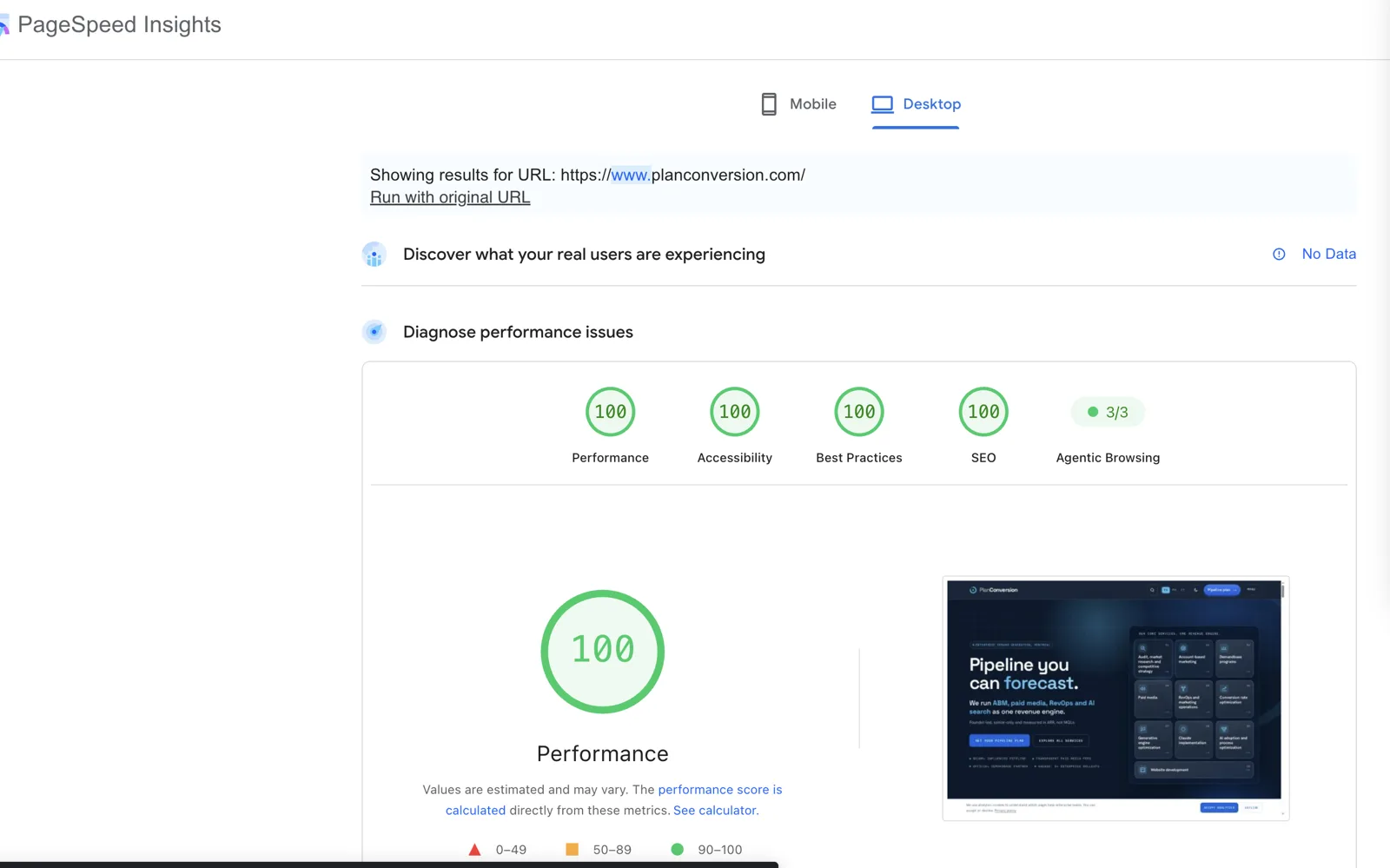
Three caveats. First, lab scores vary from run to run; Google’s Lighthouse documentation says most variability comes from changing conditions such as network routing, the test device and browser extensions, and suggests treating performance as a distribution of scores rather than one number. Second, mobile is harder: the mobile test emulates a slower device and connection, so mobile Performance moves by a few points from run to run, which is why we report the best of three runs. Third, the report shows No Data for real users. We chase field Core Web Vitals, not a screenshot, and we will publish them when the data exists.
Mobile, after the fixes
Mobile is where most sites lose points, because Lighthouse emulates a mid-range phone on a slower connection. After the fixes, our best mobile runs on November 9, 2026 were 98, 100, 100, 100 on the homepage and 99, 100, 100, 100 on a blog article. A service page scored 99, 97, 100, 100: the 97 is an open accessibility item, not a rounding error.

Why our Next.js static build is the SEO and GEO foundation
Most of the scores follow from one architectural decision: every page is generated as complete HTML at build time. planconversion.com is a static Next.js export of more than 1,200 pages in English, French and Italian. Next.js documents that a static export generates an HTML file per route at build time, which avoids loading unnecessary JavaScript on the client and lets the site run on any host that serves static files. We deploy it on Netlify from GitHub.
That matters for search first. Google’s JavaScript SEO documentation describes three phases, crawling, rendering and indexing, and says a page may wait in the rendering queue for a few seconds or longer. It still recommends server-side or pre-rendering because it makes a site faster for users and crawlers, and not all bots can run JavaScript. A static page skips the rendering queue: the content is in the first response.
It matters even more for GEO. AI crawlers are bots too. OpenAI, for example, documents OAI-SearchBot for surfacing sites in ChatGPT search and GPTBot for model training, each controlled separately in robots.txt. Google says there are no additional requirements to appear in AI Overviews or AI Mode beyond SEO best practices: the page must be indexed and eligible for a snippet, and structured data should match the visible text. Complete HTML, clean metadata and accurate schema are the base layer of generative engine optimization.
The framework, whether Next.js, Astro, Nuxt or SvelteKit, is what delivers the properties in the table below; a CMS on its own does not.
| SEO and GEO requirement | How our static Next.js build delivers it |
|---|---|
| Complete HTML without running JavaScript | Every route is pre-rendered at build time; crawlers get the full page in the first response |
| Fast Core Web Vitals | Static files from a CDN, no server work per request, little client JavaScript |
| Semantic markup | Shared components output headings, landmarks, lists and tables, so every page inherits them |
| Metadata and canonicals | Titles, descriptions, canonicals and language alternates generated at build time from the same content data |
| Structured data | JSON-LD generated from content on every page, plus a post-build step that adds a WebPage graph with breadcrumb and dateModified |
| Sitemaps and llms.txt | Generated by code on every build (Next.js supports sitemaps generated programmatically), so new pages are never missing |
| Crawler rules | robots rules generated in code, with named rules that allow the AI search crawlers we want |
| Edge delivery and indexing | Netlify serves the static output from its CDN; IndexNow pings participating search engines on deploy |
The same build would work behind a headless CMS. A CMS changes where editors write; it changes no row in this table. That is the point of our pillar on enterprise headless without a DXP.
We build fast, structured B2B sites with tracking, schema and answer-ready pages.
Images, fonts and minimal client JavaScript
Performance is mostly about what you do not send. These are the rules the performance agent enforces on every pull request.
- Images: WebP for photos and illustrations, explicit width and height on every image so nothing shifts, lazy loading below the fold, and a high-priority preload only for a hero image that is the LCP element.
- Fonts: four self-hosted WOFF2 files, two of them variable fonts, with font-display: swap; the two main fonts are preloaded, and font files are cached for a year as immutable.
- JavaScript: pages are React server components rendered at build time; client code is limited to interactive parts such as navigation, search and forms.
- Video: poster image only, with preload set to none, so visitors on phones download no video until they press play.
- Third parties: consent defaults to denied, and the tag manager and chat scripts load on first interaction or after the page has loaded, never in the critical path.
- No browser-side testing script rewrites pages; experiments are split before the page is sent.
Lighthouse weights Total Blocking Time at 30% of the Performance score and Largest Contentful Paint and Cumulative Layout Shift at 25% each, so JavaScript, the hero image and layout stability are where most of the points are.
Accessibility and agentic browsing
Accessibility scored 100 on desktop for the homepage, an article and a service page, and 100 on mobile for the homepage and the article. The service page scored 97 on mobile, which tells you the work is not finished. The accessibility agent checks every changed page for colour contrast, labelled form fields, one H1 and ordered headings, accessible names on links and buttons, and visible keyboard focus. A failing check blocks the merge.
The same rules make the site usable by AI agents. Google’s web.dev guide to agent-friendly websites recommends semantic HTML for actionable elements, a clean accessibility tree, a stable layout, labels linked to their inputs and no transparent overlays over interactive elements. Lighthouse added an Agentic Browsing category in version 13.3, still marked as under development, which DebugBear describes as checking the accessibility tree, layout shifts, WebMCP form annotations and llms.txt. Our homepage scored 3/3.
Structured data, llms.txt and crawl access for AI agents
Every page carries JSON-LD generated from the same data as the visible text, so the schema cannot drift from the page. Articles get Article, FAQ and breadcrumb markup, step-by-step sections get HowTo markup, and a post-build script adds a WebPage graph to every indexable page.
We publish llms.txt, the format Jeremy Howard proposed on September 3, 2024 as a Markdown file that helps agents use a website, plus a fuller llms-full.txt. Both are generated on every build.
Our robots rules welcome the AI search and assistant crawlers by name, because being read is a precondition for being cited. After each deploy, changed URLs are submitted through IndexNow.
Every day, a scheduled SEO health agent checks titles, canonicals, broken links and sitemap coverage, and an AI-crawler agent checks that robots rules and llms.txt still match the site.
How rare all-100 scores are
Passing Core Web Vitals is not the norm on mobile. The HTTP Archive Web Almanac 2025, based on July 2025 Chrome UX Report data, found 48% of websites had good Core Web Vitals on mobile and 56% on desktop. LCP was the hardest metric: 62% of pages had a good LCP on mobile and 74% on desktop.
Google’s thresholds for good are an LCP within 2.5 seconds, an INP of 200 milliseconds or less and a CLS of 0.1 or less, measured at the 75th percentile of page loads. A page passes only if all three meet the target.
The Web Almanac does not publish a distribution of Lighthouse scores, so we cannot tell you exactly how rare a perfect four-category score is. What the field data shows is that around half of websites do not pass the underlying metrics, and a lab score of 100 in every category needs speed plus clean accessibility, best practices and SEO audits at the same time.
Speed is also the base for testing. A slow page makes every experiment partly measure the slowness; see A/B testing without an experimentation platform for how we test on this foundation.
How PlanConversion keeps the scores after launch
None of this needed a DXP licence, a performance consultant or a testing platform. The scores come from the framework and from checks that run on every pull request, which is the business case of this series on one page. A perfect score on launch day is still easy to lose. What keeps it is the operating model: agents work through pull requests, a review board checks design, UX and CRO, accessibility, SEO and GEO, and claims on every change, and a person approves every merge. A change that breaks a budget does not ship. We describe the roles and gates in the AI agent web team operating model.
If you are comparing this approach with buying a platform, our comparison of agent-run headless vs Contentful, Storyblok and Sanity sets out where each one fits.
For clients we build the same foundation through our website development service.
We then run conversion rate optimization on pages fast enough that a test measures the offer, not the load time.
This is how we built and run our own site. If you want the same results, talk to our team and we will come back with a full solution for your stack.
Frequently asked questions
Does a 100 PageSpeed score improve Google rankings?
The lab score is a diagnostic, not a ranking factor in itself. Google lists a great page experience among SEO fundamentals, and Core Web Vitals are measured from real-user field data, so aim for passing field metrics.
Why is our mobile score lower than desktop?
The mobile test emulates a slower device and connection, so JavaScript, images and fonts cost more. On the day desktop scored 100, our best mobile Performance runs were 98 on the homepage and 99 on an article.
Why does PageSpeed Insights show No Data for real users?
The field panel uses Chrome user data, which appears only when a page or site has enough eligible traffic. Until then, use lab runs as a check and watch field data as it builds up.
Do we need Next.js to get these scores?
No. Astro, Nuxt and SvelteKit can also pre-render complete HTML. What matters is static generation or server rendering, little client JavaScript, disciplined images and fonts, and schema and metadata generated from content.
What is the Agentic Browsing score?
A Lighthouse category added in version 13.3 and still under development. It checks how usable a page is for AI agents, including the accessibility tree, layout shifts, WebMCP form annotations and llms.txt.
How often do scores change?
Every run varies slightly because network, device and browser conditions change. We track trends on key templates and block changes that break the agreed budgets, rather than reacting to one run.
Sources
- Next.js Docs: Static Exports
- Next.js Docs: sitemap.xml
- Google Search Central: Understand JavaScript SEO basics
- Google Search Central: AI features and your website
- OpenAI: Overview of OpenAI crawlers
- Chrome for Developers: Lighthouse performance scoring
- DebugBear: Lighthouse Agentic Browsing category
- web.dev: Build agent-friendly websites
- web.dev: Web Vitals
- HTTP Archive Web Almanac 2025: Performance
- IndexNow
- llms.txt: The /llms.txt file (Jeremy Howard, 2024)
Related service: Website development. See also pricing and client results.
We run enterprise B2B demand generation for teams in Montreal, Toronto, Ottawa and the United States.